Showing posts with label Gadgets. Show all posts

15 March 2017

// // 2 comments

Hackers Use $5 Speakers To Control Smartphone And Fitbit Using Sound Waves


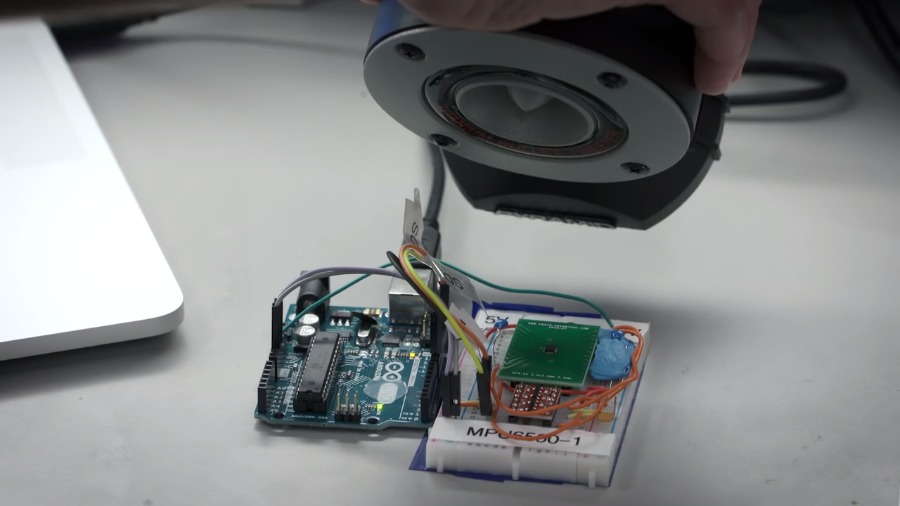
According to a new research by a team at the University of Michigan, the MEMS accelerometers found on a variety of devices can be fooled to record fictitious data using precisely tuned acoustic waves. This can be done using any low-cost speaker and used to control a smartphone or any other device connected to it.

We can control a smartphone using our voice, why not the hackers? You might have read about voice commands neatly stuffed into YouTube videos can be used to take down a smartphone. They can do it in other different ways going beyond software. And their control powers are not limited to smartphones, but it can include Fitbit, toys, cars, or other things that house an accelerometer sensor.

A team by Kevin Fu at the University of Michigan has devised a way to agitate the spring-suspended capacitive MEMS accelerometer of a device to make it think the device is in motion.

Using correctly curated sound waves emitting from a speaker, they can control any app on the smartphone or another device. During their experiments, they made a FitBit band count steps while it was sitting peacefully at one place. They were also able to make a Galaxy S5 spell out the word WALNUT in the graph readings.


The team compares their method to the breaking of glass due to an opera song. Once the sound matches the resonant frequency of the glass, it breaks. In this case, the researchers don’t concentrate on breaking things but they can trick a device into recording false data and sending it to the processor. They tested around 20 accelerometers from five makers.

However, the creepy hacking process is currently limited as a proof-of-concept. It would be too soon to think about people carrying $5 speakers and hacking our phones on the streets. The researchers have notified the chip makers and suggested some countermeasures including changes to hardware design and software defenses.

The researcher presents their paper titled “WALNUT: Waging Doubt on the Integrity of MEMS Accelerometers with Acoustic Injection Attacks” at the IEEE European Symposium on Security and Privacy on April 26.

If you have something to add, drop your thoughts. And don’t forget to tell us your feedback.
Read More

14 December 2016

// // 1 comment

How to Hide Apps and Files In Your Android Phone Calculator?


Today I am going to share the trick on how to hide important files and folders inside calculator app on Android device. Go through the post to know about it.

We all know that there are billions of users who are using Android right now. Android is the platform which implements more features than any other operating system. We have already shared few tricks on how to hide Files & Folders in Android as we all need privacy in our contents.

Today we are going to share another trick that will let you hide your files and folders in Android. We are going to use “Smart Hide Calculator” which is a fully functional calculator app but with a little twist. This app is actually a vault where you can store pictures, videos, and documents. You need to setup a password and then press the “=” button then you will get to see the files inside the app.

How To Hide Files & Folders Inside Calculator On Android


“Smart Hide Calculator” is a fully functional calculator app but with a little twist. Once you enter the password (You get to set it on the first start of app and can also be changed in future) and press the ‘=’ button then boom you are presented with an interface where you can hide, unhide pictures, videos, documents or files with any file extension placed in a folder on SD card, and if your device have root, you can also hide (freeze) and unhide (un-freeze) apps.

1 First of all, you need to download and install the app Smart Hide calculator on your Android device.


2 Now open the app and you need to set a password for using this app. This is the password that you will use to unlock your hidden files.


3 After you confirmed the password, you will see the fully functional calculator app on your screen.


4 You just need to enter the password and tap on “=” button to access the vault.


5 Once you entered the password and tapped on ‘=’ button you will get to see the options likes “Hide Files”, “Unhide Files” etc.


That’s it! You can now select the files that you want to hide. If you want to unhide the files then simply go to the vault and select the option “Unhide Files” and from there you can unhide files.


So, above is all about how to hide important files and folders inside calculator app. This is the most effective hiding tools you can have in your device because everyone will think it as a simple calculator. Hope you like the post, share it with your friends too.

Read More

06 March 2016

// // Leave a Comment

BlueStacks App Player Pro v 2.0.8.5638 Rooted MOD [Offline] (Also For Pc's Less Than 1GB Ram)

BlueStacks-App-Player-Pro.jpg

BlueStacks App Player Pro v 2.0.8.5638 Rooted MOD [Offline]

Requirements: Windows XP and up

Overview: BlueStacks App Player lets you run your favorite mobile apps fast and fullscreen in your browser and on PC or Mac.

BlueStacks App Player BlueStacks HD App Player Pro is a plateform that allows you to run applications, including games written for OS Android – on desktops, laptops and tablets and also this package contains all files to install it offline. This is a special program that uses a technology called LayerCake, which provides the correct environment for running applications for ARM-Android on a computer running Windows.

Get Root (right super – user). After you install BlueStacks on your Windows PC, you can download directly from the program needed Android-app, without having to use the Android-based smartphone. BlueStacks looks pretty neat and fits naturally into the interface Windows.

Features List

Run Android applications in full-screen and not only.Through the cloud : download your application from the phone to Windows.In 16 player preinstalled applications and you can play them if there is no number.Ability to set an unlimited number of applications. Ability to play 3D games(cache).ou can set a home screen (Launcher) to replace the standard, etc. Sync with your Android device will allow you to make calls, send SMS, take pictures and more. Has a lot of settings and system settings Android (Although they are slightly trimmed) Knows how to install applications from a computer at the touch of them Ability to obtain Root (full access to the file system, etc.) You can set Google Play, simply speaking market. BlueStacks great friends with ADB is a very big plus, if you really want, you can change the firmware. Ability to turn in FastBoot and Recovery. BluesStacks has virtual disk, such as SD Card, Data, and a few others. Which again gives you the opportunity to do a lot of “body” motions with it and enjoy all its charms. Ability to obtain Root (full access to the file system)

What’s New ? This build features a number of ‘under the hood’ fixes and improvements.

What is modded:

1.)Simple Launcher Interface

2.)SuperUser Support

3.)SuperSu Support

4.)Import Windows Files directly from your PC to bluestacks.

5.)Root Explorer Support

6.)Advanced Calculator Support.Clock, Camera, and other accessories support.

7.)Root Checker Support

8.)Build in Media Player which run mp3, mp4 and many other formats easily and many Many more…

How to Run Speed Up BlueStacks ?

Press Start Button with “R” Key [image] Search the regedit in newly opened windows [image] Click on HEKY_LOCAL_MACHINE >>> SOFTWARE [image] Then select Bluestacks >>> Android >>> Hit enter on Memory and replace 300 to 600; then click on decimal and click “OK” [image]

That’s it; you will have successfully speed up your bluestacks.

How to Install?

Run given app as an administrator. Just wait and follow the instructions during installation of setup into your PC. After Completing the installation; Bluestacks will automatically launch; just select some options which will appear on screen That’s it. Now run your all apps which supports the Android 4.4.4 and earlier.

System Requirements!

To run 3D games need support virtualization technology Intel® VT-x or AMD-V ™.

To install the BlueStacks need a video card that supports OpenGL 2.0 or later

To start BlueStacks need about 1GB of RAM, otherwise you run the risk of “infinite loading”.

For optimum performance, BlueStacks is highly desirable to update your graphics card drivers...

NVIDIA – (WHQL – certified, stable drivers. Beta – unstable, but can increase in speed)

AMD RADEON – (Download drivers – Category components: Desktop / Notebook Graphics)

INTEL – (family of products: graphics adapters)

(MORE INFO FROM BLUESTACKS)

DOWNLOAD LINKS

1.) Part One : Here

2.) Part 2 : Here

3.) Part 3 : Here

Tags: BlueStacks, BlueStacks App. BlueStacks App Player ,BlueStacks App Player Pro ,BlueStacks App Player Pro v2.0.8.5638 Rooted MOD [Offline] ,BlueStacks mod ,BlueStacks modded ,BlueStacks root, BlueStacks Rooted

Read More

05 March 2016

// // Leave a Comment

Browser,Games,Mobile Emulators & Simulators for PC!

Simulators

Maybe some of us here always use PC to test some apps and softwares before you transfer it to you mobile phone, but its hard to find them, will here I share the link of them.

Note: Some of them requires a registration.You can google it or contact me on Fb for link.

Qt Simulator (900 MB) : Here

Series 40 6th Edition (53 MB) : Here

Opera Mobile Emulator (25 MB) : Here

Windows Mobile 6 Emulator (600 MB) : Here

LG SDK for the Java Platform (60-100MB) : Here

Sony Ericsson SDK for the Java Platform (120MB) : Here

I will add the others very soon.

Read More

20 February 2016

// // 24 comments

MyWapBlog Is Now Available As An Android App (Direct Download Link Is Here)

Hii Friends....

The official android app of mywapblog is released now...this app is amazing...you can download it from playstore or from the direct link i've provided...

Words From Arvind Gupta

"We’re very excited to launch the Android version of our mobile blogging service. The Android App featuring great UI /UX gives you a faster and simpler way to post updates and manage your MyWapBlog.com blog on the go. "

This App Is Loaded With exciting features such as offline mode, WYSIWYG editor and much more and i'm sure you’ll be excited as well!

unnamed.pngunnamed1.pngunnamed2.pngunnamed3.pngunnamed4.pngunnamed5.pngunnamed6.pngunnamed7.png

With the MyWapBlog.com for Android you can:

=> Register a new blog

=> Write a post even if you’re offline

=> Publish, schedule or save a blog post as draft

=> Manage existing posts

=> Manage old and new comments

=> Upload files, pictures and videos

=> Embed files and pictures to posts

=> Manage existing files

=> Manage existing categories and add new ones

=> Change blog and profile settings

=> Change post privacy settings (Private / Public posts)

=> Receive notifications for visitor activities such as when new comments, feedback, guestbook entries are posted

This is the initial release of the MyWapBlog blogging app and does not include all the features of the web / mobile-web version.

Download the app from:

Playstore

Direct Link

Read More

14 February 2016

// // 4 comments

Jaf Pkey Emulator And The Tutorial On Installing It On Win7/Xp/Vista

Hi friend! took some effort for me to find a working version of JAF, but with enough digging and testing i got it. And today i am going to share it with you all....

TUTORIAL

1 . Right Click On "JAF Setup 1.98.62.exe"

2. Select 'Run as administrator' (windows vista, 7 and 8 only) 224919vwvaorj9v9ii9vhh.png Ignore if you get any warning while Installing.

After Installation Of "JAF Setup 1.98.62.exe"

---------------------------------------------

1. Copy "OGM JAF PKEY Emulator v 5.exe" to "C:\Program Files\ODEON\JAF\" (If you are Installed Jaf to any other Driver copy to the corresponding folder)

2. Now create "OGM JAF PKEY Emulator v 5.exe" short cut at Desktop.

How to create Short Cut ?

-------------------------------------

A. Right Click on "OGM JAF PKEY Emulator v 5.exe" B. Goto Send to ---> Desktop (create shortcut) ..

Click....Done..!!

224936mc67d69c5mjncmmj.png

( Windows XP users No Need to do steps 3,4,5,6,7)

3. Now Right Click on "OGM JAF PKEY Emulator v 5.exe" Goto "Properties".

4. Click "Compatibility" tab.

5. check "Run this program in compatibility mode for:" and set "Windows XP (Service Pack 3)"

6. check "Run this Program as Administrator"

7. Click "Apply" "OK" ........

Done ..!!!!!!

22495088118kh13nputr3w.png

Now It Will Work Perfect in Windows 7 .

If you have questions/ trouble, PM me and i'll try to help the best i can.

EDIT: When launching the PKey Emulator, JAF prompts "Box driver not installed". Just click ok, the program will work despite the missing driver.

Download below all files first download all JAF files 4 parts, and the "OGM JAF PKEY Emulator v 5"

Than unrar the files to "JAF Setup 1.98.62/"

230407242idbis2x2whz22.png

Attachment list

Read More

12 February 2016

// // Leave a Comment

Opera Modding Tutorial (Part 1)

opera-web-pass-1.jpg

*** Exclusive * Full Moding Tutorial / Mod Opera Mini Browser with S40 Phones...

So today we're going to know how to mod a opera browser without pc with the help of your s40 phone and some amazing apps.

So friends do you know what is modding?What are modded apps?

To mod is a simple way of saying modifying and costomizing an app or game to one's likeness (the modder).

APPLICATIONS NEEDED(all apps are available at our download portal)

1. BLUEFTP

2. HEXEDITOR

3. CALC4M

4. OPERAMINI.ZIP

5. CLASSEDITOR

6. Classtranslator

The First Step

Open your Blueftp and locate the opera in zip format (.zip),press open and press your upper-left key and choose select and then mark all. press menu and select extract selected items and locate a folder where you want to keep it.press yes untill you pest all.If you have done this, now lets go.......

CHANGING OPERA'S NAME

Open your classeditor, locate the extracted files, open META-INF, inside it, you will see midlet-mane, change it to any name you want....

THATS ALL READ THE NEXT PART TO KNOW MORE

1.) CHANGING OPERA'S NAME

2.) CHANGING ICON PICTURE

3.) CHANGING "CONNECTING,LOADING,PROCESSING,INSTALLING"

4.) CHANGING LOADING BAR

5.) CHANGING WELCOME PAGE

6.) CHANGING USER AGENT

7.) MODDING SPLASH SCREEN

THE LAST STEP

PACKING YOUR APP

Open your Blueftp, locate the folder where the extracted files are kept.

Open it then press menu and choose select all, it will highlight, press menu again chooseb compress to zip rename to anyname _jar ok and continue to press yes untill you finish compressing it.Now quit Blueftp, Go to phone gallery and rename it to .jar

This post is only for educational purpose .I will not be responsible for any misuse Done.

Read More
// // Leave a Comment

Opera Modding Tutorial (Part 2)

opera-web-pass-1.jpg

*** Exclusive * Full Moding Tutorial / Mod Opera Mini Browser with S40 Phones...

So today we're going to know how to mod a opera browser without pc with the help of your s40 phone and some amazing apps.

So friends do you know what is modding?What are modded apps?

To mod is a simple way of saying modifying and costomizing an app or game to one's likeness (the modder).

APPLICATIONS NEEDED(all apps are available at our download portal)

1. BLUEFTP

2. HEXEDITOR

3. CALC4M

4. OPERAMINI.ZIP

5. CLASSEDITOR

6. Classtranslator

The First Step

Open your Blueftp and locate the opera in zip format (.zip),press open and press your upper-left key and choose select and then mark all. press menu and select extract selected items and locate a folder where you want to keep it.press yes untill you pest all.If you have done this, now lets go.......

CHANGING ICON PICTURE

The picture you will see before opening operamini or the picture you, see that represent your application once you install it.In the extracted file, you will see i.png, delete it and paste the picture you want to use as your application Icon, rename it to i.png with your Blueftp or Moby explorer.

THATS ALL , READ THE NEXT PART TO KNOW MORE

1.) CHANGING OPERA'S NAME

2.) CHANGING ICON PICTURE

3.) CHANGING "CONNECTING,LOADING,PROCESSING,INSTALLING"

4.) CHANGING LOADING BAR

5.) CHANGING WELCOME PAGE

6.) CHANGING USER AGENT

7.) MODDING SPLASH SCREEN

THE LAST STEP

PACKING YOUR APP

Open your Blueftp, locate the folder where the extracted files are kept.

Open it then press menu and choose select all, it will highlight, press menu again chooseb compress to zip rename to anyname _jar ok and continue to press yes untill you finish compressing it.Now quit Blueftp, Go to phone gallery and rename it to .jar

This post is only for educational purpose .I will not be responsible for any misuse Done.

Read More
// // Leave a Comment

Opera Modding Tutorial (Part 3)

opera-web-pass-1.jpg

*** Exclusive * Full Moding Tutorial / Mod Opera Mini Browser with S40 Phones...

So today we're going to know how to mod a opera browser without pc with the help of your s40 phone and some amazing apps.

So friends do you know what is modding?What are modded apps?

To mod is a simple way of saying modifying and costomizing an app or game to one's likeness (the modder).

APPLICATIONS NEEDED(all apps are available at our download portal)

1. BLUEFTP

2. HEXEDITOR

3. CALC4M

4. OPERAMINI.ZIP

5. CLASSEDITOR

6. Classtranslator

The First Step

Open your Blueftp and locate the opera in zip format (.zip),press open and press your upper-left key and choose select and then mark all. press menu and select extract selected items and locate a folder where you want to keep it.press yes untill you pest all.If you have done this, now lets go.......

CHANGING CONNECTING,LOADING, INSTALLING,PROCESSING

To Change Connecting. Open your classeditor,locate v in the extracted files, Open it, use key 4,2,6 and 8 to move, locate connecting and chnge to any thing you like and save it. For Installing, Loading,Processing Follow the procedure above. NOTE: There are two loading, Installing and prosessing are 10 letters while loading is 7 letters to change any one, use words that corresponds with the number of words you want to replace.

THATS ALL READ THE NEXT PART TO KNOW MORE

1.) CHANGING OPERA'S NAME

2.) CHANGING ICON PICTURE

3.) CHANGING "CONNECTING,LOADING,PROCESSING,INSTALLING"

4.) CHANGING LOADING BAR

5.) CHANGING WELCOME PAGE

6.) CHANGING USER AGENT

7.) MODDING SPLASH SCREEN

THE LAST STEP

PACKING YOUR APP

Open your Blueftp, locate the folder where the extracted files are kept.

Open it then press menu and choose select all, it will highlight, press menu again chooseb compress to zip rename to anyname _jar ok and continue to press yes untill you finish compressing it.Now quit Blueftp, Go to phone gallery and rename it to .jar

This post is only for educational purpose .I will not be responsible for any misuse Done.

Read More
// // Leave a Comment

Opera Modding Tutorial (Part 4)

opera-web-pass-1.jpg

*** Exclusive * Full Moding Tutorial / Mod Opera Mini Browser with S40 Phones...

So today we're going to know how to mod a opera browser without pc with the help of your s40 phone and some amazing apps.

So friends do you know what is modding?What are modded apps?

To mod is a simple way of saying modifying and costomizing an app or game to one's likeness (the modder).

APPLICATIONS NEEDED(all apps are available at our download portal)

1. BLUEFTP

2. HEXEDITOR

3. CALC4M

4. OPERAMINI.ZIP

5. CLASSEDITOR

6. Classtranslator

The First Step

Open your Blueftp and locate the opera in zip format (.zip),press open and press your upper-left key and choose select and then mark all. press menu and select extract selected items and locate a folder where you want to keep it.press yes untill you pest all.If you have done this, now lets go.......

ChANGING LOADING BAR

The red line you see when installing or opening your operamini. The default colour is red [the hex value is AC1614] to change it, just get the hex value of the colour you want to use. then open your classeditor, locate the extracted files, open f.class then PRESS 0 [ZERO] the page will divide into 2, press 7 in the hex box enter 3575 look at the screen, 3575 look at the left side of the screen, press 6 once you will see AC1614 in hex, 2 [TWO] CHARACTERS CAN be changed at once you scroll to AC press 5 THREE TIMES, CHOOSE THE NEW HEX, REPEAT THE PROCEDURE TO CHANGE ALL THE HEX.

THATS ALL READ THE NEXT PART TO KNOW MORE

1.) CHANGING OPERA'S NAME

2.) CHANGING ICON PICTURE

3.) CHANGING "CONNECTING,LOADING,PROCESSING,INSTALLING"

4.) CHANGING LOADING BAR

5.) CHANGING WELCOME PAGE

6.) CHANGING USER AGENT

7.) MODDING SPLASH SCREEN

THE LAST STEP

PACKING YOUR APP

Open your Blueftp, locate the folder where the extracted files are kept.

Open it then press menu and choose select all, it will highlight, press menu again chooseb compress to zip rename to anyname _jar ok and continue to press yes untill you finish compressing it.Now quit Blueftp, Go to phone gallery and rename it to .jar

This post is only for educational purpose .I will not be responsible for any misuse Done.

Read More
// // Leave a Comment

Opera Modding Tutorial (Part 5)

opera-web-pass-1.jpg

*** Exclusive * Full Moding Tutorial / Mod Opera Mini Browser with S40 Phones...

So today we're going to know how to mod a opera browser without pc with the help of your s40 phone and some amazing apps.

So friends do you know what is modding?What are modded apps?

To mod is a simple way of saying modifying and costomizing an app or game to one's likeness (the modder).

APPLICATIONS NEEDED(all apps are available at our download portal)

1. BLUEFTP

2. HEXEDITOR

3. CALC4M

4. OPERAMINI.ZIP

5. CLASSEDITOR

6. Classtranslator

>

The First Step

Open your Blueftp and locate the opera in zip format (.zip),press open and press your upper-left key and choose select and then mark all. press menu and select extract selected items and locate a folder where you want to keep it.press yes untill you pest all.If you have done this, now lets go.......

CHANGING THE WELCOME PAGE

To Edit The page that will show when installing Opera before accept. Open your classeditor, locate the extracted files, open v, scroll with key 8, you will see:

http://www.operamini.com/firsttime/4.2

replace it with the site you want TO SET AS YOUR WELCOME PAGE.

THAT'S ALL SEE THE NEXT PART TO KNOW MORE

1.) CHANGING OPERA'S NAME

2.) CHANGING ICON PICTURE

3.) CHANGING "CONNECTING,LOADING,PROCESSING,INSTALLING"

4.) CHANGING LOADING BAR

5.) CHANGING WELCOME PAGE

6.) CHANGING USER AGENT

7.) MODDING SPLASH SCREEN

THE LAST STEP

PACKING YOUR APP

Open your Blueftp, locate the folder where the extracted files are kept.

Open it then press menu and choose select all, it will highlight, press menu again chooseb compress to zip rename to anyname _jar ok and continue to press yes untill you finish compressing it.Now quit Blueftp, Go to phone gallery and rename it to .jar

This post is only for educational purpose .I will not be responsible for any misuse Done.

Read More
// // Leave a Comment

Opera Modding Tutorial (Part 6)

opera-web-pass-1.jpg

*** Exclusive * Full Moding Tutorial / Mod Opera Mini Browser with S40 Phones...

So today we're going to know how to mod a opera browser without pc with the help of your s40 phone and some amazing apps.

So friends do you know what is modding?What are modded apps?

To mod is a simple way of saying modifying and costomizing an app or game to one's likeness (the modder).

APPLICATIONS NEEDED(all apps are available at our download portal)

1. BLUEFTP

2. HEXEDITOR

3. CALC4M

4. OPERAMINI.ZIP

5. CLASSEDITOR

6. Classtranslator

The First Step

Open your Blueftp and locate the opera in zip format (.zip),press open and press your upper-left key and choose select and then mark all. press menu and select extract selected items and locate a folder where you want to keep it.press yes untill you pest all.If you have done this, now lets go.......

changing User AGENT

i.e bowser details? You can change you browser information example version from 7.0 to 8.0 , 8.0 to 10.0 etc.....

To do this, open your classtranslator, locate handlerul.class change the details to what u like, press option, choose save.

THAT'S ALL READ THE NEXT PARTS FOR MORE

1.) CHANGING OPERA'S NAME

2.) CHANGING ICON PICTURE

3.) CHANGING "CONNECTING,LOADING,PROCESSING,INSTALLING"

4.) CHANGING LOADING BAR

5.) CHANGING WELCOME PAGE

6.) CHANGING USER AGENT

7.) MODDING SPLASH SCREEN

THE LAST STEP

PACKING YOUR APP

Open your Blueftp, locate the folder where the extracted files are kept.

Open it then press menu and choose select all, it will highlight, press menu again chooseb compress to zip rename to anyname _jar ok and continue to press yes untill you finish compressing it.Now quit Blueftp, Go to phone gallery and rename it to .jar

This post is only for educational purpose .I will not be responsible for any misuse Done.

Read More
// // Leave a Comment

Opera Modding Tutorial (Part 7)

opera-web-pass-1.jpg

*** Exclusive * Full Moding Tutorial / Mod Opera Mini Browser with S40 Phones...

So today we're going to know how to mod a opera browser without pc with the help of your s40 phone and some amazing apps.

So friends do you know what is modding?What are modded apps?

To mod is a simple way of saying modifying and costomizing an app or game to one's likeness (the modder).

APPLICATIONS NEEDED(all apps are available at our download portal)

1. BLUEFTP

2. HEXEDITOR

3. CALC4M

4. OPERAMINI.ZIP

5. CLASSEDITOR

6. Classtranslator

If you want any above app comment below and i'll give you

>

The First Step

Open your Blueftp and locate the opera in zip format (.zip),press open and press your upper-left key and choose select and then mark all. press menu and select extract selected items and locate a folder where you want to keep it.press yes untill you pest all.If you have done this, now lets go.......

MODDING SPLASH SCREEN

Spash-screen: When you open Operamini, you will see a picture together with loading or installing and Opera default splash screen is O, you might have seen some with someone's picture. You can make your picture appear as well. To creat a splash, you need a picture in png format {.png} to obtain accurate result. But if you don't have picture in .png format don't worry for there is solution. May be you have it as jpg,jpeg, gif, use propaint to open the picture and save it as png .It's adviceable to use picture with small size e.g: between 20kb to 40kb and the resolution of the picture shouldn't be morethan 128*160.

Open your classeditor, open your png picture, press * [star] key, you will see red bar behind []PNG use key 8 to scroll untill you highlight all, pres 5 then 4 choose copy, then back, open V, press in the text box write PNG , ok it and press #, you will see the PNG press to move back, press 2 [] behind the PNG use 8 to scroll down untill you reach END B, [] press 5 then 4 choose insert, press upper-left key and save.

Remember to take down the size of the picture, open your calc4m and enter the size {bytes} of your picture, press down key 2* twotimes, then press and hold #, write the result that you get now open your Hexeditor, enter the result that you get from calc4m, then press execute, it will list out some hex values, write down those hex values that are written in bold letters, they will be 14 in number. Open your classeditor, then open your V press key 0, the page will divide into 2, press 7, clear what ever you see and enter 27 ok it, press 6 and 4 and you will see the following:

2CDC 0000 2CF8 0000 2DBF 0000 2EAI OOOO 2FCI 0000 30D7 0000 32IB 0000 3365 0000 33D4 0000 3444 0000 34FA 0000 35B9 0000 3684 0000 384B 0000

Press 3, to replace those hex values with those that you get from Hex editor { it will be picking the hex values 2 by 2, press key 6 to move to the next value} replace it with the ones you got.

NOTE: don't touch those Zeros {0000} change numbers only. press upper-left and save it. Then quit the classeditor.

THAT'S ALL READ THE NEXT PART FOR MORE

1.) CHANGING OPERA'S NAME

2.) CHANGING ICON PICTURE

3.) CHANGING "CONNECTING,LOADING,PROCESSING,INSTALLING"

4.) CHANGING LOADING BAR

5.) CHANGING WELCOME PAGE

6.) CHANGING USER AGENT

THE LAST STEP

PACKING YOUR APP Open your Blueftp, locate the folder where the extracted files are kept.

Open it then press menu and choose select all, it will highlight, press menu again chooseb compress to zip rename to anyname _jar ok and continue to press yes untill you finish compressing it.Now quit Blueftp, Go to phone gallery and rename it to .jar

This post is only for educational purpose .I will not be responsible for any misuse Done.

I hope you enjoy the tutorials if you have any problem the do comment under any post i'll try my best to help you.And in return i want you to share the posts as much as you can , sharing will cost you nothing but yes! it will give me the thing i want ,,i.e. More valuable visitors like you......

Read More

23 January 2016

// // 2 comments

[Explained][Hot][Awsome]What Is Google Wifi At 100 Stations And How It Works?

RailTel has announced the launch of free high-speed public Wi-Fi service in partnership with Google at Mumbai Central Railway Station. Google had announced its plans to bring high-speed Wi-Fi to 400 Indian railway stations during PM Narendra Modi’s visit to Google HQ in Mountain View, California.

Google plans to extend the service quickly to cover 100 of the busiest stations by the end of this year. The project will eventually cover 400 railway stations across India.

With Railwire Wi-Fi service, the travelers will be able to easily stream high definition video while they are waiting. Google says users of its public Wi-Fi service can save videos offline on its YouTube app for viewing during the journey.

“Our intent was to fulfill Indian Railway’s vision of providing Railway passengers access to high speed Internet through our Optical fiber communication network. Affordable smartphones have made it possible for the common men to experience the power of Internet. With our partnership with Google, we are very confident of rolling out a robust, scalable service at Railway stations in the near future,” SAID R.K Bahuguna, Chairman and Managing Director, Railtel.

“We’re delighted to launch India’s first high speed public Wi-Fi service in partnership with Indian Railways. Bringing affordable Internet access to millions of people is an important part of making the Internet both easily accessible and useful for more than 300 million Indians who are already online, and the nearly one billion more who are not,” SAID RAJAN ANANDAN, VP and Managing Director, Google India.

The free public Wi-Fi service will be available in Allahabad, Patna, Jaipur and Ranchi shortly.

Google CEO Sundar Pichai had first announced about the the company’s free WiFi at railway stations in India when PM Modi had visited the company campus in Mountain View, California in September. Under the project, Google plans to provide free and high-speed Wi-Fi access to railway commuters at over 400 stations in India. Google has partnered with Railtel Corporation to make this project a reality.

How’s the project going to scale out? Which stations will get covered?

According to Google’s announcement today, the first station to get free Wi-Fi under this scheme will be Mumbai Central, where testing has already been carried out. Google’s free Wi-Fi at Mumbai Central goes live by January, 2016. Google plans to make free Wi-Fi live at over 100 stations in India by the end of 2016. The free Wi-Fi scheme will target stations across each railway zone in India.

At the end of 2016, Google will evaluate the project to see how it will expand the free Wi-Fi scheme further. Google says that preparations are already on in multiple stations to make the project a reality.

So how exactly will Google’s free Wi-Fi work? Why has it partnered with RailTel?

Railtel is the PSU which owns a Pan-India optic fiber network exclusively on railway track. It has laid out over 45,000 kms of optic fibre networks across the country, which Google will utilise for its Wi-Fi.

In this case, Railtel will be the ISP, while Google will provide the Wireless Area Networks (WAN) and will set-up the points of access at platforms. It should be noted that Google’s free WiFi will only work at the platforms and is not meant for the trains.

Will Google have some guidelines, standards for this free public WiFi?

Google says the idea with its free WiFi is to ensure wide coverage and high capacity. According to Google VP for Access and Emerging Markets Marian Croak, the company sees a potential of 10 million users accessing its WiFi each day by the end of 2016 from across these railway stations. And Google wants to make sure that these 10 million users get broadband quality experience when using its Wi-Fi.

For instance, Google will try and ensure that the WiFi railway users who watch videos on the network get at least HD standard streaming. Google will also aim to maintain speed, efficiency across a board of devices.

Will the service always be free? What’s the revenue model here for Google?

Google says that the service will be free to begin with, although it has not yet specified whether it will eventually charge for this WiFi. It should be noted that free WiFi in other public places like airports is free for a limited time period only. On the revenue model, Google hopes that this will be self-sustainable and it will start exploring with different revenue models later on. For now the focus will be on getting the project up and running.

ITS BETTER THAN AMAZING....:mrgreen:

Read More
// // Leave a Comment

Railtel And Google Brings Free Wifi To Mumbai - Central Railway Station

RailTel has announced the launch of free high-speed public Wi-Fi service in partnership with Google at Mumbai Central Railway Station. Google had announced its plans to bring high-speed Wi-Fi to 400 Indian railway stations during PM Narendra Modi’s visit to Google HQ in Mountain View, California.

Google plans to extend the service quickly to cover 100 of the busiest stations by the end of this year. The project will eventually cover 400 railway stations across India.

With Railwire Wi-Fi service, the travelers will be able to easily stream high definition video while they are waiting. Google says users of its public Wi-Fi service can save videos offline on its YouTube app for viewing during the journey.

“Our intent was to fulfill Indian Railway’s vision of providing Railway passengers access to high speed Internet through our Optical fiber communication network. Affordable smartphones have made it possible for the common men to experience the power of Internet. With our partnership with Google, we are very confident of rolling out a robust, scalable service at Railway stations in the near future,” SAID R.K Bahuguna, Chairman and Managing Director, Railtel.

“We’re delighted to launch India’s first high speed public Wi-Fi service in partnership with Indian Railways. Bringing affordable Internet access to millions of people is an important part of making the Internet both easily accessible and useful for more than 300 million Indians who are already online, and the nearly one billion more who are not,” SAID RAJAN ANANDAN, VP and Managing Director, Google India.

The free public Wi-Fi service will be available in Allahabad, Patna, Jaipur and Ranchi shortly.

Read More

19 January 2016

// // 8 comments

[Hot][Modded][Java][Special]Uc Legend : A Special Uc Browser For Java ,Now With Keylogger

UC Legend Is A Special Mod Of UC Browser . It Has Lot Of Features. Some Are Very Powerful Also . You May Have Already Used It. But In This Version A New Feature Is Added . It's Called Keylogger . Now You Can Use Keylogger In Java . <<===ABOUT===>> Size=647kb uc-legeng-with-keylogger.png
Now It's Total Feature Is 27.

Here Is The List : 01.Ability To Open Up To 10 Tabs .

02.Fast Loading Bar Fills Up To 95% .

03.Capacity Of The Paste Area Is Now 99999 Characteristics.

04.Handler Menu v2.0.4 .

05.Screenshot Support both bmp and png .

06.Downloads At Time Can Be Change .

07.Download Buffer Can Be Change .

08.Notify by Sound When Download Finished .

09.Auto Rename Uploaded File According To Your Choice .

10.Auto Start Download At a Error .

11.Font Can Be Changed to BOLD or ITALIC .

12.Advanced Options Screenshot Added .

13.Changeable download Block at MenuExtra .

14.Touch Support Added in MenuExtra .

15.Transparent Background Image Option Has Been Added .

16.Added Music Player To Listen Musics Direct From UC .

17.jad2jar Option Added , After Downloading A Jad File It Opens A Tab To Download The Jar File .

18.Auto Exit Option When Downloads are Complete .

19.Auto Heap Clean Option To Free Memory .

20.Two Different Download Counter Option Added .

21.Free Copy Restriction Removed .

22.Text Import Export Option Added .

23.New Task Text Limit Increase To 5000 .

24. Keylogger Added[New] .

25. New Amazing Logo .

26. Splash Screen Logo Changed .

27. Splash Screen Loading Color Changed To Skyblue.

KEYLOGGER PASSWORD = UCF

{}DOWNLOAD{}

What Is And How To Use Key Logger?

Keylogger is an application Which can help you track the keywords typed in your browser it can also be used for hacking Facebook,Twitter,Google , And Many Other Social Networks ( I Will Post A Tutorial On Hacking Soon .).

To Open Key Logger In Uc Legend You Should Go To Any Full Text Edit Area Such As Browser's Address Url Click on The Type Box And Type " UCF " Without The Quotes.and the tracking Wondow with all the texts you typed in your browser including passwords....

Enjoy It And If You Have Any Problem Comment Here...

Please Comment If You Liked The My 150th Article Your Comments Motivate Me To Post More And More For You.....Thanks!

Read More

17 January 2016

// // Leave a Comment

[Apps][Java][Program]Easy Flash Maker(Swf Creator)

«Easy Flash Maker»

(Swf Creator) Is A Tool To Create Simple Macromedia Flash Movies (Swf Files) Quickly And Easily (Click To See Samples).

It Is Well Known That Flash Creation Using Professional Software Is Very Difficult Process For Beginners And Even For More Experienced Users.

We Have Tried To Make This Process As Simple And Convenient As Possible.

The Simplest Movie Can Be Created And Stored As *.Swf File For A Few Seconds.

Moreover, This Program Can Automatically Create An Animation For The Selected Object Using Starting And Finishing Points.

DOWNLOAD

Read More

16 January 2016

// // 1 comment

Ringtone Maker By Subha (modded by raju 2014)

icon-ring-maker.jpg

RINGTONE MAKER...

Super Developer By: Subha Brother, Souvik..
****************
Modded By= Raju2014

What Is The Best Software For Cutting Audio Files. Especially Mp3 I Have Used The Ringtone Maker..

@Feature@

»New Graphics«
»New Logo«

Dialled Gren Key To Full Screenshot
For Touch Keypad Divice.

=AND=
Press "*" Key To Coroup Scrensot Only For Keypad Phone..
smoth-ring-maker.jpg
0smoth-ring-maker.jpg
1smoth-ring-maker.jpg
2smoth-ring-maker.jpg
3smoth-ring-maker.jpg
4smoth-ring-maker.jpg
5smoth-ring-maker.jpg
7smoth-ring-maker.jpg
DOWNLOAD KEYPAD
DOWNLOAD TOUCH


1= Press "*" Key.
2= See Disply Top Left Site, To Red Colour" " Signal, And Press Right Key, Left Key, Up And Down Key For Your Manual Size Croup Screensoot.. For Keypad Version.

Or Touch-Keypad User For Press Jast Call Key..
Hope You Understand, Brother? Thanks..
DOWNLOAD KEYPAD
DOWNLOAD TOUCH
Read More

13 January 2016

// // 1 comment

[Amazing][Hot][Java][Android]Galaxy Chat And Play : A Must Have App

imgout?file_id=13846236583109625858&s_ui

Description

Sign up for free and join over 30 million registered users from around the world! Create your avatar and dive into an incredible virtual world. Chat, make new friends, play online games and much, much more! imgout?file_id=12684307878950466562&s_uiimgout?file_id=8378866635354107906&s_uidimgout?file_id=10531587257302269954&s_uiimgout?file_id=14296596545810046978&s_uiimgout?file_id=6505369190469449730&s_uid

Key Features

*Customize Avatar*

Choose from a wide variety of colorful avatars, fancy clothing items and alluring costumes. Stand out from the crowd!

*Socialize*

Explore hundreds of chat rooms or create your very own chat room, decorate and make it popular. Send private messages, post to your blog and microblog. Galaxy is just so good for socializing!

*Online games*

Play Mafia, Gold Rush, Safari and many other interactive games to win exciting prizes.

*Dating*

Meet even more interesting people or find your very special one!

*Ranks*

Become the best player, make your avatar the most powerful or be a top model. Choose your rank!

*Virtual pets & gifts*

Get a cute pet, care for it, watch it grow and give birth. Make stunning gifts to your Galaxy friends and family!

*Ad free*

You won't be annoyed with ad banners. Nothing will distract you from chatting with your friends.

So what are you waiting for?

Get the ultimate social networking experience today!

Download It According To Your Phone On The Official Website : blackdownloadarsdk.png

Read More

11 January 2016

// // Leave a Comment

Mp3 Mixer Version 1 By Subha (Souvik) Brother.

This is just version 1..(BETA)(NEW VERSION WILL BE UPDATED SOON)

I think you already know what the thing the mp3 mixer is otherwise read the help option present in app if you want to know more.....

I will try some improvements in next version.. For now just check the engine..

I%2Bam%2Ba%2BDJ.jpg DOWNLOAD

FULL CREDITS GOES TO SUBHA BRO FOR CODING THE APP.I JUST SHARED IT....

Read More