Showing posts with label News. Show all posts

19 October 2017

// // 4 comments

List Of Most Interesting Websites 2017


The internet has not-so-good websites, good websites and then there are some of the best websites out there.Today I have brought you the list of some of the most interesting websites 2017 that you can have fun visiting or it will just make your life easier by any means.


There are so many websites around and it is difficult to know each and everyone of them. But you will surely find these websites useful one or the other way; although some of you might already know some of these websites.


Some of the most interesting websites 2017


Mailinator

Just like 10minutemail, Mailinator is another solution for the spam problem, or a temporary email address. For signing up for a site that requires an email address, you can use this instead of your normal email. It’s real simple; you just enter a prefix or you name to “@mailinator.com”. Setting up your temporary email is quick and easy on Mailinator and within a minute you can have your new temporary email address for you to signup for a site on your other tab. The best part is that your temporary Mailinator address gets automatically deleted after several hours which is why it cannot go unmentioned in the most interesting websites 2017 list.


Click here to try Mailinator!

PicMonkey

Sometimes you want to quickly edit a photo without having to learn a complicated image-editing program like Photoshop. PicMonkey makes it really simple. You can easily upload a photo from your computer for editing or you can slip one in from your Facebook or MyHub. There are a ton of editing options from cropping to resizing to applying filters or manipulating your image to suit your imagination. PicMonkey has a user-friendly interface that you can use without any complications or being afraid of messing things up. Once you are done editing an image, you can save the edited image to your computer. To use PicMonkey and save images after editing, you require a facebook account or you can create you own account. This is where Mailinator might come in handy for you. They also have an iOS and android apps which you may want to check out.


Start a free trial on PicMonkey

Wide-Screen Gaming Forum – WSGF

For those of you with wide-screen 4K or multiple monitors, WSGF can make your gaming experience on PC even better. You can find your games in the games database listed in alphabetical order and you can check if that game is supported for your monitor. This site can also offer fixes and workarounds to get your game working properly on your gaming monitor. It also gives medals for various categories based on the level of support. If you are a PC gamer, this is one of the sites you should bookmark to help with your gaming monitor.


Visit WSGF Forum

Codecademy

Now some of you might already know this site since it’s rapidly gaining popularity. But if you starting out to learn how to code, Codecademy is great for learning the basic concepts. They offer several courses including Javascript, Python and even Ruby. Just select a course you want to learn and you will be given interactive step-by-step instructions.


Keepa

Some of you may be familiar with Camelcamelcamel but in some ways Keepa is lot more useful in price tracking on Amazon. The Deals section in keepa will find you some of the biggest discounts on Amazon at present. Keepa also has a very useful search functionality. Search for a specific product and you will also be provided with the price history graph of that product. You can select “Track Product” and adjust your desired price point or range. Then you can put in your email address, Facebook or Twitter to receive a notification when that product’s price reaches or drops below the point you set. Click on “Start tracking” and you are free to forget it.


Track a product with Keepa

AlternativeTo

This site is really useful when looking for alternatives for software. How it works is very simple. You put in the name of a program, for eg., Photoshop and select your program. It will give you the description of Photoshop and along with a list of alternatives to Photoshop. You should definitely check out AlternativeTo for alternatives to software. You might just find something better than what you are currently using.


Printfriendly

We all have been on websites where we wanted to print out an article or a tutorial but most of the time the ads and pictures make the print out a mess. This site makes print outs more printer friendly. Copy the URL you want to get a print out of and paste the URL on printfriendly here. and click on “print preview” button. A cleaner article from that page is rendered out for getting a print out. When you are ready to print, select “Print” to send it to your printer or you can also choose to create a PDF or email. Do check out this site if you want cleaner print outs.


Also read: Some Truths About Computer Programming

IsThereAnyDeal

If you are PC gamer and wish to get the best price on games you should definitely check out IsThereAnyDeal. The site’s homepage will show you some bundle specials along with some other deals on games. Or you can search for the game that you want.


So check out if there is any deal to make sure you get the best deal. IsThereAnyDeal.com


OpenLibrary

Here is another great website from the folks of the internet archive. OpenLibrary offers more than 250,000 free e-books that can be borrowed in either PDF, EPUB or online forum. Best of all, it is all completely legal. So the next time you are looking to find a good book to read, check out OpenLibrary.


Conclusion

That concludes a list of some of the most interesting websites of 2017. Feel free to mention in the comments below if we have missed any useful website in this list that you think more people should know about.


Share this article among your friends and let them know some of the most interesting websites 2017 that can make their tasks easier.

Read More

05 June 2016

// // Leave a Comment

Everything You Need To Know About Google Mobile Friendly Update


Google Algorithm Update
According to Google Webmaster Central, Google will be rolling out the most significant mobile algorithm change to date starting April 21. Google already owns the mobile revolution, with Android as the biggest mobile platform, Google Search as the biggest mobile search provider, and Play Store as the largest mobile app store. Google wants to push forward with more control over websites, and hence a mobile-friendly algorithm update is inevitable. Here is what you can expect from the update starting April 21.

This is a significant change

This change will affect mobile searches in all languages worldwide and will have a significant impact in search results. What will be the actual impact of an algo change that is “significant”? It’s anyone’s guess. Already, we know that this update will be bigger than Panda or Penguin. We also know that Google considers mobile to be so significant that they are working to dominate nearly all of its manifestations. With this search update, we should brace ourselves for a major adjustment in the way that mobile search functions.

App indexing is important

App indexing is a new feature of the algorithm that will be exclusive to sites with associated Android apps. And according to Google Webmaster Central:
Starting today, we will begin to use information from indexed apps as a factor in ranking for signed-in users who have the app installed. As a result, we may now surface content from indexed apps more prominently in search.
The purpose of this feature is probably to tighten the connection between mobile search and mobile application. Eventually, there will probably be little distinction between the two. Bridging the gap via search is a logical choice.

Real-time algo

This algorithm will run in real-time, so technically, you can make changes any day, and as soon as Google picks up on the change, the site will start to benefit from the new mobile-friendly algorithm change.

Obviously, Google can only assess a site’s mobile friendliness when it crawls the page and indexes it for search. At this point, your site is scored. If the page is not mobile friendly on April 21, but becomes mobile-friendly on April 25, then we can assume that Google’s next crawl should be able to identify it as such.

Each page assessed individually

A notable feature of the mobile algorithm is that it analyzes mobile compatibility on a page-by-page basis, rather than a website-wide basis. So if your site has some mobile-optimized pages, but some non-optimized ones, then Google will look at them separately and promote the ones that are optimized. They won’t “penalize” an entire site based on the off chance that a few pages aren't optimized.

The exact details of the algo are yet to be confirmed. Let's sit tight and wait for April 21st. What we do know is, Google is leading the way forwards in mobile, and you will have to adopt to it or die in search result pages.

Best of luck :)
Read More

28 May 2016

// // 3 comments

[Update] Lambda Expressions : More Custom Template Flexibility (New Blogger Update)

Lmbda expressions in blogger

More custom template flexibility

Hello friends i have a good news for you that you may already know :p anyways if you aren't aware of a new awsome feature recently introduced by official blogger team.The new feature is called Lambda Expresions.With this feature we can do many interesting and amazing things like adding an image to a number of posts by only adding some code in template instead of adding in one by one in each and every post.Sounds interesting right...?

Words from bloggger team

Last May, we added some expressions to our templating language to make it easier for you to customize your blog’s look and feel. These new expressions proved popular with those of you who enjoy advanced blogging tools, so we wanted to offer you even more flexibility.

Starting today, we’re introducing a new set of operators, which we’re calling lambda expressions, that allow you to apply rules to whole sets of data (think posts, comments, or labels), rather than just individual instances.

Okay Let's Get Into It

Let’s say you wanted to add a flower image to all posts with the label “Flower,” for example. With lambda expressions, simply define a variable name that each item in the set will take, and then refer to the variable name as though it were each item (as shown in below code) :
[code]


[/code]
Lambda expressions in blogger demo

There’s lots more that you can do using lambda expressions, like only showing posts in your feed with a given label or quickly calculating how many posts you have with a given number of comments.

For a full list of the new lambda expressions available, check out the blogger help forum.

Happy Blogging!

Like our facebook page to get more updates about lambda expressions.
Read More

25 April 2016

// // Leave a Comment

Long Lasting Batteries Are Developed Now Forget Charging Your Phone

University of California at Irvine (UCI) researchers have accidentally discovered a technology to create batteries that can last pretty much forever. In a recently published paper, Mya Le Thai, a PhD candidate at the university, explained how her team used nanowires (several thousand times thinner than a human hair), which is extremely conductive, with a surface area that supports storage and transfer of electrons.


But nanowires are fragile and grow brittle in a typical lithium-ion battery - until her team coated a gold nanowire in a manganese dioxide shell. This was further encased in a Plexiglas-like gel.


Reginald Penner, chairman of UCI's chemistry department, said: "Mya was playing around and she coated this whole thing with a very thin gel layer and started to cycle it."

"She discovered that just by using this gel she could cycle it hundreds of thousands of times without losing any capacity. That was crazy, because these things typically die in dramatic fashion after 5,000 or 6,000 or 7,000 cycles at most."


They tested this new battery over 200,000 times for 3 months, without any loss of capacity or power.

"The coated electrode holds its shape much better, making it a more reliable option,"

"This research proves that a nanowire-based battery electrode can have a long lifetime and that we can make these kinds of batteries a reality."

This can mean batteries that could last forever, used in appliances, cars and planes.
Read More

22 April 2016

// // Leave a Comment

Opera Browser Added Free VPN To Its Developer Version

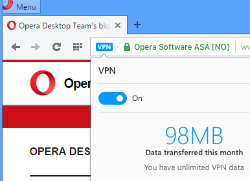
Opera has become the first major browser to add a free VPN client to its web browser.


The VPN offers AES-256 encryption and allows users to browse the Internet privately. In addition, the free VPN also helps to circumvent website blockades, a feature many torrent users will appreciate.

Free VPN

Back in 2006 Opera was the first major browser to include BitTorrent support, and today it releases another feature that will appeal to millions of users.

The company has added a free and unlimited VPN to the developer versionof its browser. This means that users can browse the web securely at the flick of a switch.


Privacy aside, the built-in VPN is also an ideal tool to circumvent website blockades. This may come in handy for the aforementioned BitTorrent users as well, as sites such as The Pirate Bay are blocked in many countries.


The VPN connection is provided by the Canadian VPN service SurfEasy, which like many other VPNskeeps no logs. SurfEasy was acquired by Opera last year and VP of Marketing Steve Kelly tells TorrentFreak that privacy and censorship were the main reasons to add the free VPN to Opera.


“Everyone deserves to surf privately online if they want to. Today, it is too difficult to maintain privacy when using the web, and way too many people experience roadblocks online, like blocked content,” Kelly says.


By releasing an integrated, free and unlimited VPN in the browser, they make it simple for people to enhance their privacy and access the content they want.It is worth highlighting that the VPN connection is limited to the web browser. This means that any content shared outside the browser, through traditional torrent clients for example, is not private.


Opera’s in-browser VPN uses AES-256 encryption and SurfEasy says that the initial response has been very strong. The network is prepared to handle hundreds of thousands of simultaneous connections without any problems.
With the addition of a VPN feature Opera hopes to set a new standard for modern browsers. Earlier, it was already the first major browser to include an ad-blocker.


This is the first VPN option integrated into a major browser. Also, it’s delivered from a company you can trust, with an extensive history of providing reliable and trustworthy internet products - Kelly told us.

More details about the built-in VPN are available at the Opera blog. People who want to give it a spin should download the latest developer release, as the feature is not available in the regular version yet.

Direct download links for windows mac and linux are given below

  1. DOWNLOAD FOR WINDOWS (.exe)
  2. DOWNLOAD FOR MAC (.dmg)
  3. [button src="http://get.geo.opera.com/pub/opera-developer/38.0.2205.0/linux/Opera_Developer_38.0.2205.0_Setup.deb" rel="nofollow"]Linux(.deb)[/button]
Read More

21 April 2016

// // Leave a Comment

Blogger updated the post editor to help with mixed content

Back in September, blogger announced that HTTPS support was coming to blogspot.com, making it possible for you to encrypt connections to your blog; since then, many of us have enabled HTTPS for our blogs.


In some cases, not all of our blog’s functionality has worked over HTTPS due to mixed content errors often stemming from our template, gadgets, or blog post content.


To help spot and fix some of these errors, they're releasing a mixed content warning tool that alerts you to possible mixed content issues in your posts, and gives us the option to fix them automatically before saving.


To use the tool,we should turn on HTTPS for our blog,open the Blogger editor HTML view, and click Save or Publish. If the editor detects any errors they will be shown above the editor, along with the option to fix the errors found.

Happy blogging!

Like Our Facebook Page For More Updates
Read More

23 January 2016

// // Leave a Comment

Explained What Is Google Wifi And How To Use It | VipTechWorld

Free Google Wifi

RailTel has announced the launch of free high-speed public Wi-Fi service in partnership with Google at Mumbai Central Railway Station. Google had announced its plans to bring high-speed Wi-Fi to 400 Indian railway stations during PM Narendra Modi’s visit to Google HQ in Mountain View, California.

Google plans to extend the service quickly to cover 100 of the busiest stations by the end of this year. The project will eventually cover 400 railway stations across India.

With Railwire Wi-Fi service, the travelers will be able to easily stream high definition video while they are waiting. Google says users of its public Wi-Fi service can save videos offline on its YouTube app for viewing during the journey.

Our intent was to fulfill Indian Railway’s vision of providing Railway passengers access to high speed Internet through our Optical fiber communication network. Affordable smartphones have made it possible for the common men to experience the power of Internet. With our partnership with Google, we are very confident of rolling out a robust, scalable service at Railway stations in the near future,
SAID R.K Bahuguna, Chairman and Managing Director, Railtel.

"We’re delighted to launch India’s first high speed public Wi-Fi service in partnership with Indian Railways. Bringing affordable Internet access to millions of people is an important part of making the Internet both easily accessible and useful for more than 300 million Indians who are already online, and the nearly one billion more who are not,
SAID RAJAN ANANDAN, VP and Managing Director, Google India.

The free public Wi-Fi service will be available in Allahabad, Patna, Jaipur and Ranchi shortly.

Google CEO Sundar Pichai had first announced about the the company’s free WiFi at railway stations in India when PM Modi had visited the company campus in Mountain View, California in September. Under the project, Google plans to provide free and high-speed Wi-Fi access to railway commuters at over 400 stations in India. Google has partnered with Railtel Corporation to make this project a reality.

How’s the project going to scale out? Which stations will get covered?


According to Google’s announcement today, the first station to get free Wi-Fi under this scheme will be Mumbai Central, where testing has already been carried out. Google’s free Wi-Fi at Mumbai Central goes live by January, 2016. Google plans to make free Wi-Fi live at over 100 stations in India by the end of 2016. The free Wi-Fi scheme will target stations across each railway zone in India.

At the end of 2016, Google will evaluate the project to see how it will expand the free Wi-Fi scheme further. Google says that preparations are already on in multiple stations to make the project a reality.

So how exactly will Google’s free Wi-Fi work? Why has it partnered with RailTel?


Railtel is the PSU which owns a Pan-India optic fiber network exclusively on railway track. It has laid out over 45,000 kms of optic fibre networks across the country, which Google will utilise for its Wi-Fi.

In this case, Railtel will be the ISP, while Google will provide the Wireless Area Networks (WAN) and will set-up the points of access at platforms. It should be noted that Google’s free WiFi will only work at the platforms and is not meant for the trains.

Will Google have some guidelines, standards for this free public WiFi?


Google says the idea with its free WiFi is to ensure wide coverage and high capacity. According to Google VP for Access and Emerging Markets Marian Croak, the company sees a potential of 10 million users accessing its WiFi each day by the end of 2016 from across these railway stations. And Google wants to make sure that these 10 million users get broadband quality experience when using its Wi-Fi.

For instance, Google will try and ensure that the WiFi railway users who watch videos on the network get at least HD standard streaming. Google will also aim to maintain speed, efficiency across a board of devices.

Will the service always be free? What’s the revenue model here for Google?


Google says that the service will be free to begin with, although it has not yet specified whether it will eventually charge for this WiFi. It should be noted that free WiFi in other public places like airports is free for a limited time period only. On the revenue model, Google hopes that this will be self-sustainable and it will start exploring with different revenue models later on. For now the focus will be on getting the project up and running.

ITS BETTER THAN AMAZING....
Read More