Showing posts with label Website Tools. Show all posts

11 April 2016

// // Leave a Comment

How to minimize use of your data speed up your net

Internet connections in rural India is really painful. Like me, I'm out of town, I use limited 2G and 3G prepaid data pakes.

In mobile phones these connections are OK, but in case of PC, web browsing in PC will ruin your day.

yc067.gifOut of Time or Out of Data .yc038.gif

After a long work I got some tips, and I would like to share them.

Well There will be three steps.

Step 1: Blocking Unwanted, hidden Apps and services.

You can check which apps are using internet by opening Resource Monitor(Task Manager> Performance Tab> Open Resource Monitor> Network Tab). 164821rdh3cxq9x5lrqj9d.png 1.) Blocking Windows Update Service:

In most of cases windows update service[svchost.exe(netsvcs) used by BITS - Background Intelligent Transfer Service] eats all the bandwidth and data usage.

To stop Windows Update in background follow these steps:

1. Go to Control Panel > System and Security > Windows Update > Change Settings.

In drop down menu chose "Check for updates but let me choose whether to download and install them" and uncheck "Recommended Updates". Save and exit. 164941gsdjuuc0c7np0d03.png 2.) Open Services by RUN (Windows R) > Type "services.msc". 165332g72h43tgsqsm2xee.png Scroll down and select Windows Update.

Right click > Properties > Choose Startup type "Disabled" > Apply > OK 165056dmojgl2twwwzk0ff.png Then select Background Intelligent Transfer Service.

Right click > Properties If the service is running then first STOP it by clicking Stop. Choose Startup type "Disabled" > Apply > OK. 165157yq8bz8qjdcyowvbw.png 3. Open System Configuration by RUN > type "msconfig". In services tab uncheck BITS. Apply > OK. 165244m2pt8o9wodmcjomw.png

Blocking unwanted apps:

You can block any particular app from connecting to internet using Windows Firewall. But it is a long process and if you have to block a lot of apps then it will crack your eyes and brain. So all you have to do is download a app called "Glasswire". Its a free and paid app. But the free version is enough for you. It has a lot of eyes, it will record all your network activity. It has network graph, firewall, usage record, themes and lot more.Well, download and install Glasswire. Open firewall and turn it ON.It will list all new apps whenever they connects to internet and gives a notification to you. 165434w4ijcuusw5xsgjc5.png Block any unwanted apps by clicking the left side fire sign. (Check screen shot)

Step 2: Download and install Opera Web Browser latest version.

It is a chromium based browser with all the functions of chrome and more than that. It has a option Called "Opera Turbo", which will compress webpages and images using opera server (global-tu rbo2-lvs-hopper.opera-mini.net) same as Opera Mini in mobile phones. It does not use too much data in background, as Chrome and firefox do. 165518ex13im31ol779111.png

Step 3: Download ad-blockers ans tracking killers.

Ads and trackers use half of the data in webpages. Time to kill them.Download Adblock Plus and Ghostery. 165556z070k8y84c94k2c9.png165613hatt09h0h5h9531a.png

Some more tips:

1. Install a network monitor to check network activity all time.

Whenever u found some unwanted activity end them using task manager or block them by firewall.

You can check IOBit Performance monitor or install Rainmeter and use some network monitor skin.

165721q89gb48v0clvzs08.png

2. Block unwanted ips or hosts using firewall.

Search Google and make things easy. Good Luck.

Thanks for reading.

Keep Visiting - http://minetechworld.heck.in

Read More

15 March 2016

// // Leave a Comment

Mywapblog Latest Feature : Now We Can Share And Like Posts On Facebook,Twitter....

Hello Friends! Did you noticed the brand new feature of mywaoblog....

Yes we can now share our post on facebook,like our posts if we have connected our page with mywapblog,and the best now we can share our posts on twitter also.....

Mywapblog Share Buttons,Earn Money,Tips And Tricks,Love,Best Java Game

Friends this is the best opportunity to write some nice posts and share them on twitter.Twitter is a large social media from where you can get a large traffic for your blog.And if you are my loyal reaaders you must have know that on mywapblog traffic is only the key to earn better revenue....So don't miss it and keep connected with us by visiting here daily to get awsome tips , tricks , tutorials and methods to boost your online presense...

Thankyou pals! ~The Vip (Jalaj)

Read More

13 March 2016

// // Leave a Comment

How to start earning money from your mywapblog blog

Introduction

We discussed lot about earning money from the internet , Almost every topic is related to earn money from blogger blog . But today we are discussing about earning money from Mywapblog network . Mywapblog is one of the greatest mobile blog network without having any competitors , Wapsite builders like Wapka and Xtgem also have blogging tool's but wapmasters who are aiming to create blog will choose Mywapblog .

How to Earn Money From MyWapBlog

It is very easy to earn money from the internet especially from MyWapBlog , Because blog is the only one thing which get huge amount of traffic from Search Engine than the Downloading Wapsite . To earn money from your mywapblog , Just follow the steps that given below .

*.Log-in to YourDashboardonMyWapBlog. *.Click on the "Ads" Link under the "Appearance" Tab .

*.There you can see some of the "Ad-Network's" Click the first one "UCWEB Union" .

*.Sign-Up with " UC-Union" For Adding Your Site .

*.Log-in to "Uc-Union" Then Add Your MyWapBlog .

*.Add your wapsite to "UC-Union" Like the "Screenshot" Given below .

capture.png

*.It will take24 hoursto get theApprovestatues of your blog on UC-Union .

*.After gettingApprovefrom UC-Union , Click on the "Management" .

*.Copy the "ID" Which located near at your MyWapBlog "Title" .

*.Now come to the "Ads" Page on "MyWapBlog" Dashboard again .

*.Select "Ad-Network" As "UC-Web Ad-Code" .

*.Paste the "ID" Which you copied from "UC-Union" To the "Text-box" Which located under the "Publisher ID" Label .

*.Click on the "Save" Button .

*.You areDone.

You can also choose "Adsense" and the other Ad-Networks which located under the "Ad-Networks" Label , They also having the same steps like "UC-Union" Do . It is better you to select "UC-Union" or "Adsense" For earning money . Because their service is using millions of wapmaster's to earn money from their wapsite .

I hope you well enjoyed this article , If you have any doubts or suggestions related to this article , Please let me know by using the comment box given below . Thanks

Read More

03 March 2016

// // Leave a Comment

How To Convert Your Big Css Into A Short One

Hello Dear Friends.....

Today we're going to know how we can make long-long css into a short one of just 70-80 words.....

Here We Go.....

1.) First go to your Dashboard < Theme < Edit Css.

2.) Then copy your whole css after that paste it in notepad.

3.) Now save your css with some name (ending with .css).....For example - i've saved my css file in notepad with name " Minetechworld.css ".

4.) Now Again login to your Mywapblog account and go to Dashboard < Upload File and Upload Your Css File (for me its Minetechworld.css).

5.) Now copy the address of your uploaded file.

6.) Now go to you Dashboard < Themes < Edit Css And delete/remove your long css.

7.) Now Paste the url address you've copied in Step 5 into the below code and then paste that code at the place of your long css.

8.) Now save your theme.

CONGRATULATIONS NOW YOU HAVE CREATED A SHORT CSS FOR YOUR BLOG......

If you liked this article then please support me by sharing it on facebook.This Blog Is protected by DMCA so don't even think of copying my posts if you love your blog brcause DMCA can easily delete it if you violated its rights.

Read More

02 March 2016

// // Leave a Comment

An amazing and working way to view the pc-view of any website on the internet

Hello Friends ! I've Not posted any tricks from somedays because of my journey...anyways now i am back here with an amazing trick to view the pc mode of any website through your mobile....

The trick starts here :

Things You'll Need

1.) A facebook account.

2.) Some Friends In That account.

3.) Uc Browser (Available At Our Download Portal)

4.) An Internet Connection (which i guess you have already :p ).

Working Steps

1.) Login to your facebook account.

2.) After the login select any of your friend and go hit the message button and message him the name of site which you want to see in pc-view.

NOTE: when you are messaging the site name dont forget to add " http:// " before the site or page name. For e.g : http://mywapblog.com is CORRECT but only mywapblog.com is NOT-CIRRECT.

3.) Okay Now Click On the Name Of the Site you've send to your friend.....

4.) Congratulations now you are in the pc view of the site you want.....

HERE ARE SCREENSHOT OF MYWAPBLOG PC-VIEW WHICH I ACCESSED VIA MY ASHA 311 WITH UC BROWSER : uc-browserscreenshot-1799.png

If you liked this article then please comment and share it (instead of copying it) your comments motivate me to post more for you

Read More

19 January 2016

// // 8 comments

[Hot][Modded][Java][Special]Uc Legend : A Special Uc Browser For Java ,Now With Keylogger

UC Legend Is A Special Mod Of UC Browser . It Has Lot Of Features. Some Are Very Powerful Also . You May Have Already Used It. But In This Version A New Feature Is Added . It's Called Keylogger . Now You Can Use Keylogger In Java . <<===ABOUT===>> Size=647kb uc-legeng-with-keylogger.png
Now It's Total Feature Is 27.

Here Is The List : 01.Ability To Open Up To 10 Tabs .

02.Fast Loading Bar Fills Up To 95% .

03.Capacity Of The Paste Area Is Now 99999 Characteristics.

04.Handler Menu v2.0.4 .

05.Screenshot Support both bmp and png .

06.Downloads At Time Can Be Change .

07.Download Buffer Can Be Change .

08.Notify by Sound When Download Finished .

09.Auto Rename Uploaded File According To Your Choice .

10.Auto Start Download At a Error .

11.Font Can Be Changed to BOLD or ITALIC .

12.Advanced Options Screenshot Added .

13.Changeable download Block at MenuExtra .

14.Touch Support Added in MenuExtra .

15.Transparent Background Image Option Has Been Added .

16.Added Music Player To Listen Musics Direct From UC .

17.jad2jar Option Added , After Downloading A Jad File It Opens A Tab To Download The Jar File .

18.Auto Exit Option When Downloads are Complete .

19.Auto Heap Clean Option To Free Memory .

20.Two Different Download Counter Option Added .

21.Free Copy Restriction Removed .

22.Text Import Export Option Added .

23.New Task Text Limit Increase To 5000 .

24. Keylogger Added[New] .

25. New Amazing Logo .

26. Splash Screen Logo Changed .

27. Splash Screen Loading Color Changed To Skyblue.

KEYLOGGER PASSWORD = UCF

{}DOWNLOAD{}

What Is And How To Use Key Logger?

Keylogger is an application Which can help you track the keywords typed in your browser it can also be used for hacking Facebook,Twitter,Google , And Many Other Social Networks ( I Will Post A Tutorial On Hacking Soon .).

To Open Key Logger In Uc Legend You Should Go To Any Full Text Edit Area Such As Browser's Address Url Click on The Type Box And Type " UCF " Without The Quotes.and the tracking Wondow with all the texts you typed in your browser including passwords....

Enjoy It And If You Have Any Problem Comment Here...

Please Comment If You Liked The My 150th Article Your Comments Motivate Me To Post More And More For You.....Thanks!

Read More

07 January 2016

// // Leave a Comment

About Making A Website In PHP

PHP stands for PHP: Hypertext Preprocessor. It is the most widely used server side script and its main advantage is that it is open source which will help people to get rid of other server side technologies which require a license and is not in the range of a common person. PHP is versatile and there are many scripts written in that like Market Directory

PHP is complied at the server side and the end person which is using is using a browser get the HTML and Java script which it can recognize. A PHP code is usually written like some HTML code and PHP code in between. So building a PHP site is quite easy and In order to write a PHP statement here is the example

?>

If you want to comment any code in a PHP page than following is the thing you can do /*This is a comment block */ . In order to declare a PHP variable we have to following things

$var_name = value; For string varibles here is the thing to do $txt=”Hello World”;

Here are a few functions of PHP

echo strlen(”Say some”);

This will give a result 8 because there are 8 chracters. Major advantages of building a site in PHP is that the hosting you get for PHP is very wide spread and most of the programme libraries and software written in PHP are open source so it is usually very cheap . Other PHP Coding advantages are that PHP servers are usually fast and there is no licensing for each and every product you purchase or it.

So making a PHP site is usually beneficial even for bigger organizations unless they have a special requirement which cannot be fulfilled in PHP.

PHP is easy to learn and understand you can even learn in programming in PHP and PHP coding in few days even if you don’t know the object oriented programming. There are also some free editors available in market for free . On the other hand if you are planning to launch an ASP.NET site you need to hire a programmer for coding and to do development and have to spend thousands of dollars before the site is even launched and hundreds of dollars after that for maintainability. So programming a site in PHP and launching a site is easier.

Read More

14 December 2015

// // 2 comments

TunnelBear Review – Best Free VPN for Mac, iOS, Windows & more

If you are about to buy a VPN service for yourself, here are the few things that you should consider:

*.Should support multiple devices.

*.Offer multiple options to connect such as Chrome extension

*.One account all devices.

*.Security & Encryption

When we are travelling , and we have to connect with numerous public Wi-Fi at the airport, Cafe & various other places. One of the biggest problems with using free WI-Fi is the security of our accounts. You can’t be 100% sure that your data transmitted over that free network is 100% secure.

A reliable VPN service ensures that your data is not being seen by anyone else in between, and you are safe even when using free internet at public transit.

Features & review of TunnelBear:

I bumped into TunnelBear for the first time while I was looking for a free VPN for My iPhone. It got the great recommendation from many popular publications like Forbes, Lifehacker, which let me install it the right away. What I loved about the TunnelBear is, the User Interface & how easy it is for a non-technical users to get started with it. Once you have downloaded any of their supported device software, right now they offer:

*.iOS app

*.Android app

*.Mac OS App

*.Windows App

*.Chrome Extension

You will be first prompted to create a free account. Once your account is created, you get 500MB of free data every month, to use a free account. You can earn extra 1GB every month just by tweeting by TunnelBear from the app itself.

After registering your account, you need to select the plan you want to use. I would recommend selecting the free plan to try out the app, and later on, you can upgrade to paid plan as required.

After that (Depending upon the platform) you need to install the VPN profile on your iPhone. The process is simple, and Bears at TunnelBear will guide you for the same.

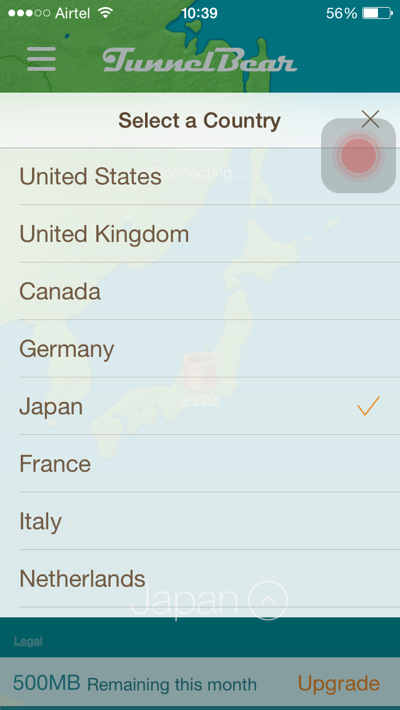
By default, TunnelBear will select your location, and you can change your location from location selector.TunnelBear-VPN-Country-Selection.png When you select the new location, it will take few seconds to create the tunnel & after that you will be browsing on VPN. Once the connection is setup, (On iPhone you will notice VPN written at the top status bar), you can open any app or browser to browse as if you are accessing the internet from selected country.

As you can see from the screenshot above, I have 1500MB bandwidth remaining in this month. You can also get 1 GB free bandwidth just by tweeting about this ultimate VPN service from the app itself.

You can download TunnelBear Android app, or for Windows or Mac from the official download page here. Even if you are not ready to use VPN service as a software, you should install TunnelBear Chrome extension, which will encrypt and secure your browsing. None the less, if you are in college or office, you will be able to access all banned sites with this chrome extension.

Is TunnelBear VPN Right for you?

TunnelBear offers unlimited data at the price of $2.99 only, which is one of the cheapest in the VPN industry.

You can use the same account on all your devices, which makes it one of the best VPN service available.

Even if you are not so used to using a VPN service, I highly recommend you to download the software & setup your free account. Next time when you are travelling, and connecting to a free WI-fI network, ensure that you use a VPN tunnel software to keep yourself safe from hackers.

Create your free account

Don’t forget to share this guide with your Friends, family & colleagues to help them secure their internet life.

If you want me to review any other VPN client or you recommend any other service, feel free to let me know via comment. Don’t forget to share your review of TunnelBear VPN service.

Read More

02 December 2015

// // Leave a Comment

[Hot] New Mywapblog Html Code To Add Border To Your Post Images

Hello! Dear Visitors....

Today I Am Going To Tell You A Method By Which You Can Add Border To The Images In Mywapblog Or In Any Other Place Which Allow You To Add Link Images...

Lets See An Example...

An ImAge Without Border

jalaj24.png

Images With Borders

Loading The VipLoading The Vip...Loading The Vip...

As You Have Seen Examples Now Lets Come To The Code.Copy All The Code From The Below Box And Change The Url To The Url Of Your Image-

Remove All Asterisks From The Code

Now Lets Do Some Editing

You Can Change The Strength Of Border By Changing The Digit 5 To Whatever you want....

Mywaoblog Users Can Also Alter Their Css Properties To Make Their Border More Beautiful. I'll Post On This Topic Soon. Till Then Enjoy It.And Keep Visiting Minetechworld.heck.in For More....:mrgreen:

Read More

08 November 2015

// // Leave a Comment

[SPECIAL POST]How to Stop Facebook Videos From Automatically Playing[READ FULL]

hands_woman_laptop_notebook_pexels.jpgFollow these steps to stop Facebook videos from automatically loading and playing.
If you are using Facebook on the Web (desktop browser):

1) Go to Facebook's video settings page when you are logged into your Facebook account.

2) Click the button to the right of Auto-play Videos and choose Off from the drop down menu.

If you are using the Facebook app for Android, use the following steps to stop Facebook videos from autoplaying:

1) Tap the three horizontal lines icon.

2) Scroll down and tap App Settings.

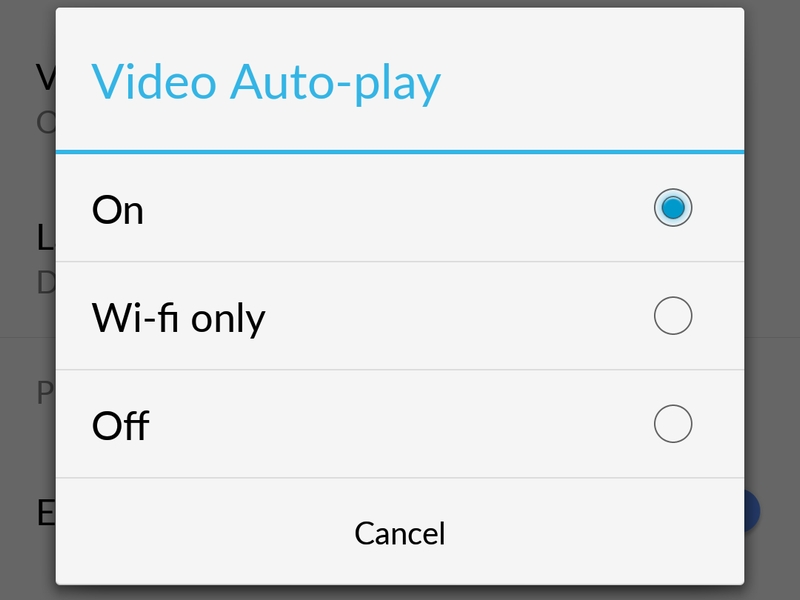
3) Tap Video Auto-play.

4) Tap Off to stop videos from automatically playing, or Wi-fi only if it's okay for videos to autoplay when you are on Wi-Fi. android_facebook_auto_play_disable.jpg

If you are using the Facebook app for iPhone, use the following steps to disable video autoplay:

1) Tap the three horizontal lines icon labelled More near the bottom right corner.

2) Scroll down and tap Settings.

3) Tap Account Settings.

4) TapVideos and Photos.

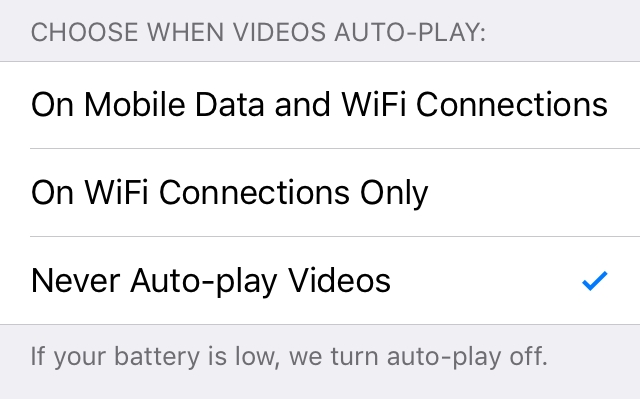
5) TapAuto-play.

6) Tap Never Auto-play Videos to completely stop Facebook videos from automatically playing, or On WiFi Connections Only if you don't mind videos autoplaying when you are on Wi-Fi.iphone_facebook_auto_play_disable.jpg

If you are using the Facebook app for iPad, use the following steps to stop videos from automatically playing:

1) Tap the three horizontal lines icon labelled More near the bottom right corner.

2) Scroll down and tapAccount Settings.

3) TapVideos and Photos.

4) TapAuto-play.

5) Tap Never Auto-play Videos to completely stop Facebook videos from automatically playing, or On WiFi Connections Only if you don't mind videos autoplaying when you are on Wi-Fi.

You have one less annoying thing in your life now that Facebook videos autoplay is disabled. For more tutorials, visit here daily.....

¤¤¤¤¤¤¤¤¤¤¤¤¤¤¤¤¤¤¤¤¤¤ THIS POST IS SPECIAL POST BECAUSE THIS POST IS MY 100th NO. POST I WANT TO THAKYOU FOR VISITING HERE AND ENCOURAGING ME TO POST MORE AND MORE FOR YOU....... ¤¤¤¤¤¤¤¤¤¤¤¤¤¤¤¤¤¤¤¤¤¤

Read More
// // Leave a Comment

Use Google.com As Clock With Calender (New Trick)

Google-Clock.jpgHello my dear visitors how are you all? Im too busy with my studies so that i cant get time for blogging. So sorry im.

Today we know how to use google as a clock and calender.

Sometimes we lost our phones time and we use many webpage for solve this provlem. But google is better then all.

Go to Google.com in Search box Write... Now google will show you current time of bangladesh.

Change it with your own country.

Its also show you current date.

Visit this link for more.

Read More
// // Leave a Comment

Harsh Agrawal The Blogger Who Inspired Us

Harsh_Agrawal.jpg

Harsh Agrawal a Icon Blogger Now. Harsh Agrawal who make blogging from New Delhi, India. He is one of the best earner blogger. He started his blog http://shoutmeloud.com in 2008. First time he was very ignore about blogging. But Day by day he reaches at higest level of blogging

Shoutmeloud.com is an awarded blog. Its awarded for "Best Blog of India" He earn about $175K in a year.

Harsh is very helpful person. His blog is very easy to use. He's famous for his simple writting style. Many of us who understand english a little bit Harsh write her content for them.

Shoutmeloud.com is a technology based blog. It fill up with many usefull tricks tips, idea and much more.

Its may be best blog for learning Blogging.

Harsh Loved making journey. He loved to blogging from anywhere of the world.

Harsh always were a Cool Eye glass. He look so cool.

You may know more about him on Wikipedia.com @ http://en.wikipedia.org/wiki/Harsh_Agrawal

Twitter=> twitter.com/denharsh

Fb=> www.facebook.com/shoutharsh

Read More

22 October 2015

// // Leave a Comment

Nano Mag Responsive Blogger Template Download Blogger

Design Your blogspot Nano Mag Free Responsive Template Download Nano Mag Free Responsive Blogger Template Download Blogger NANO MAG FREE 2015-16 Blogger best TEMPLATE DOWNLOAD Design Best Styles

biggrin its Blogger TemplateFor Blog User Blogger.com Use Custom Nano mag Free Responsive Free template to create Good Design

Free Responsive Template For blogspot Site

Live Demo Here Or

biggrin Its Zipped File Download &Extract It by xplore or 7 zip To get XML file...

download-large.gif

Tags : responsive blogger template 2015, adsense responsive blogger template, premium responsive blogger template, sevida responsive blogger template, simple responsive blogger template, responsive blogger template free download, responsive blogger template gallery, best responsive blogger template

Read More

20 October 2015

// // Leave a Comment

How To Hijack Your Friends Browser Using Chrome Extension and Open Any Links on his Browser From Your PC

Disclaimer:This post is for security Awareness and any Misuse caused by you ain't Minetechworld concern!

Today we are here with cool browser hack that is method for How To Hijack Your Friends Browser. Till now we had discussed lots of tricks and tips that you can do in your PC browser, but this one is just ultimate.

Did you ever try to hijack someone’s browser or say try to force another computer browser to open certain links just from your PC, if you don’t then time to do. As here we have a cool method by which you can force any of your friend’s browser to open particular link remotely from your PC.

This method is very much wacky and you can do lots of pranks with your friends. So have a look on complete guide discussed below to proceed.

How To Hijack Your Friends Browser Using Chrome Extension

The method is quite simple and depends on a cool chrome extension that you will get from google chrome market and that will allow you to connect to your friend’s browser and open any specified app that you want to open in his/her browser.

So you just need to follow some simple steps below to proceed.

Note:- This trick will only work if the both your and your’s friend’s will have this extension in Google Chrome.

Steps To Forcibly open tabs in your Friend’s Browsers:

1. First of all you need to download and install a cool ad on for your google chrome browser that is (Shove).copy and paste this link to your browser to download it https://chrome.google.com/webstore/detail/shove/joikmhfafincmonklackcgcbbpcpdhjk?hl=en

2. Just tap on Add Extension on the popup appears.

3. Now click on shove extension and there you have to create an account first to access its service

4. Now proceed with the instructed and now you will see the option Add a Friend

5. Now there in field you will add your friend’s username whose browser you want to hijack.

6. Now your friends list will get updated and now select the friends in which you want to open particular URL.

7. Now you just need to add the address and the page will get open in your friend’s browser.

Thats it you are done, this is the most amazing way to hijack and make fun with your friends by opening different links according to your wish in your friends browser remotely.

Enjoy!Everything is all about learning on www.minetechworld.heck.in

Read More
// // Leave a Comment

Mywapblog Color Codes List...

This is all mywapblog color code & wapka color code & HTML color code...

U can use this code ur HTML design! & more customized ur mwb & wapka website!

This code work in all HTML & BB code systems! Try With Your Own Choice!!

Click Here For Color Here..

Remember, this color code chart represents the 216 web safe color palette. You can actually use any hexadecimal value you like!

-Just remember that if you venture outside of the 216 web safe colorpalette, your website might look much different for your users.

Read More

18 October 2015

// // 24 comments

{{How To Become A VIP}}

vip.gif

If you want to become VIP[Very Important Person] here in my site,kindly Submit your facebook id,2go username,your website name and your number(optional) In comment box...

Click here to submit your information for VIP

NOTE:: I am not collecting any money or credit for people to become vip here.

I will always be changing our vip in every 5-6 days and once you will add me on facebook, I will download your profile picture and use it as your vip picture...drop your comments if you need more things to know...

I will also include your website address to that vip and you can gain more visitors and popularity....

THE VIP COUNTER IS HERE....

TOTAL VIP

Read More

17 October 2015

// // 7 comments

How To Make A New Icon Appear In First Post Of Your Blog

Hello All Bloggers! Today I Am Here To Share A Css Code Which Will Let You Make Appear A New Post Icon In Front Of Your First Post.....

So By Not Wasting Your Precious Time I Am Sharing The Code....

The Code Is In A Css File Which I Have Zipped And Uploaded You Have Just To Download The Zip File And Open It After That Copy Everything Inside It And Paste It To Your Mywapblog Themes Section Area.....

blackdownloadarsdk.png I Will Only Reveal Password If This Post Have More Than 5 Comments......

HAPPY BLOGGING.....

THE CODE IS TESTED AND CURRENTLY WORKING ON THIS BLOG

Read More
// // Leave a Comment

Top 10 most visited websites in the world

Today I want to share about“Top 10 most visited websites”. This list is created with the help of Alexa Rank Analysis.websites.jpg

1.jpgGoogle.com Google is a American multinational industry. It provides many internet services and web based products. It works on Internet search, cloud computing, advertising technologies. Google search engine provides search anything on internet from all over world. It’s searching Technology is also unique. It is founded by Larry Page and Sergey Brin.

2.jpgFb.com Facebook is a social networking site. It is developed by Mark Zuckerberg with his college fellows.It started from Feb 2004. On Facebook currently more than 600 million active users.It helps to connects people, make friends, share photos, videos, links to others.

3.jpgYoutube.com YouTube is a video sharing website where you can share any video, search video, watch any youtube video online.It is also help to generate movie clips, user content, television clip, video blogging.

4.jpgYahoo.com Yahoo full name is“Yet Another Hierarchical Officious Oracle”.It provides many services on the internet like Yahoo Search, Yahoo Directory, Yahoo Mail, Advertising, Yahoo News, Yahoo Maps, Yahoo Video etc.

5.jpgBlogger.com Blogging is a blog publishing service which is used to share your thoughts and information to others. blogs are hosted by sub-domain of blogspot.com. It is free service to share something on internet.

6.jpgIt is a leading Chinese language search engine. Baidu provides more than 50 services like Baidu Baike, Baidu Map, Baidu Post Bar, Baidu MP3, Baidu Image Search, Baidu Video Search etc. It is also provides mobile search engine.

7.jpgWikipedia is a free, web-based, collaborative, multilingual encyclopedia. Wikipedia was launched in 2001 by Jimmy Wales and Larry Sanger. Wikipedia is freely available to all users to share any data and also available edit option to everyone. You can add more information to any post.

8.jpgIt is a collective brand name for a set of services and software products from Microsoft. It provides many services like instant messaging, live account, SkyDrive, photo gallery, Hotmail, movie maker, search engine, secure online file storage etc.

9.jpgTwitter is a micro-blogging and social networking service provider website. It enable users to send and read message. You can share text tweet, share link to your followers. You can also send and receiver any personal message. The tweet text character limit is fixed. Limit of text tweet is 140 characters. It was launched in July 2006.

Qq.com 10.jpgTencent QQ, is known as QQ. It is the most popular free instant messaging computer program in Mainland China. Active QQ users counts are more than 600 million. It becomes the world largest online community. It also provides shopping platform, QQ mail, QQ games, Search Engine, Virtual Pets, blogs etc.
Read More

15 October 2015

// // Leave a Comment

How To Add " Scroll To Header ,Bottom,Comments " Link In Your Mywapblog

Hello All Bloggers! How Are You All......

Today I Will Tell You How You Can Add ;

1.)Scroll TO Top/Title.

2.)Scroll To Comment.

3.)Scroll To Bottom.

Buttons On Your Mywapblog Site And Make It Too Easy For Your Visitors To Go Through Your Blog....

You Can Use These Codes Anywhere You Want In Your Navigation Menu , In Your Posts And Even In Your Css...

Okay Lets Start....

1.) Scroll To Top/Title Code ;

2.)Scroll To Comments Code ;

3.)Scroll To Bottom Code ;

Demo Is Here....

Go To Bottom

Go To Comments

Go To Top

Remove All The Asterisks ( * ) Before Copy/Paste The Code

You Can Also Add Images Instead Of Texts Just Like This One....

arrow7.png

If You Want Scroll Buttons For Your Wapka Site Or Any Other Site That Supports Java Script You Should Check The Post Smooth Smart Scroll Button Codes

If You Have Any Problem The Comments Are Always Welcomed....

dmca_protected_sml_120ai.png Tip For Copiers/Spammers : Hello! If You Are Going To Copy This Post Then Think Again Because Now This Site And Its Contents Are Copyrighted And Protected By DMCA.

Read More
// // 2 comments

How To Set Up A Free Domain In Your Mywapblog's Blog

How to Take Domain Name In Mywapblog Very Important & Greatest post for Mywapblog Owner....

You create A Mywapblog site, like as. heck, faa.im, mwb.im etc Its looks redface UNsmart Everyone want to take custom Domain in Wapblog!

razz So Today I Introduce U to ' Took a Free Domain Name For Your Blog..

Let's Try to work it!

Firstly visit Freedom.com & Create An Account...If, U have Pc or Android phone, Please Use Google chrome, its Works Fine Form Android Chrome, And Mozilla Pc!

check-domain.png

01. After Creating An Account, Check Your Desire Domain Name

domain-selected.png

02. After Check Complete. .If Its Show Available..Get free & Click selected....Or If Not Available, Search Again With Appropriate Name...

12-months-select.png

03. Select Domain Than Make its 12 Months Validity

domain-agree-conditions.png

04. Carefully Click ✔ Term's & Conditions. Than Continue...Go to domain list....Domain

manage-domain.png

05. Click On Manage Domain

register-glue-record.png

06. Click Management Tools -- Click On Register Glue Record...

ns-server-mwb.png

07. Follow Your mywapblog Domain parking Help Area...(What is this?)

  1. Nameserver Records
  2. 1. ns1.mywapblog.com
  3. 2. ns2.mywapblog.com
  4. IP = 107.161.181.167
registered-1.png

08. First Box put ns1.mywapblog.com & IP 107.161.181.167 Click Save ChangeS

registered-2.png

09. Second modify Box put ns2.mywapblog.com & IP 107.161.181.167 & 107.161.181.167 Click Save Change

biggrin After Saving Changes..Click Back

manage-dns.png

10. This Time Click Manage Freenom DNS

panal-setup-success.png

11. Add Two box Extra..

  1. First box -- Enter full domain name with www-- Type→CNAME -- Target→ cd.mywapblog.com
  2. Second Box-- Enter domain name without www-- Type→A-- Target→ 107.161.181.167
record-added-successful.png

12. Than click Save changes...Yes!!

Record Added successfully!

park-name-time.png

13. Wait! 10 Minutes!! razz Back To Mywapblog Dashboard..Domain parking Area...Put Your Full Domain with Www....Then Click park.

successfully-setup.png

14.Now it will show,

Custom DOMAIN set Successfully!

razz Thanks For seeing this post! If Hve any problems make comments!! U can take .com -- .net -- .info Domain also!!

Don't Copy Post

Click To Go To Comments

Click To Go To Title

Read More