
Showing posts with label Facebook Tricks. Show all posts

25 February 2018

// // 13 comments

How to download public and private facebook videos for free?

Download-Facebook-Videos-4j1ssFacebook has grown at a very fast pace and today it has left all social networking sites behind. Video and photo sharing are one of the most important features of Facebook. Gone are the days when people used to share trending videos and images on Facebook, now Facebook itself makes stuff viral. It’s giving tough competition to Google-owned YouTube as well when it comes to video content being consumed on both platforms.
Downloading Facebook videos isn’t something which has many solutions and the ways to do it aren’t as popular as downloading YouTube videos. Since the inception of YouTube, people have used different methods to download YouTube videos and save them for later viewing purposes. I’ve read lots of content about how to download Facebook videos online in the past, but each of them had some bugs and many posts took me to many irrelevant pages.

        After lots of googling and exploring the web, I found a website “GetFbStuff.com” which doesn’t just help you in downloading Facebook videos. It also hosts hundreds of thousands of Facebook videos in its directory and it has many other useful features.
The features of the websites are below:
1. Facebook Video Downloading Online
2. Downloading Private Facebook Videos
3. Downloading Facebook Page Photo Album
4. Online Vimeo Video Downloader
Getfbstuff.com is an online Facebook video downloader which helps you to download videos on all kind of devices. Since it is a web-based application, it supports Windows, Mac OS X, Ubuntu and all other kinds of operating systems. Moreover, you can also use it as a Facebook private video downloader as well.
Just the way Youtube videos are hosted on Google’s servers, Facebook videos are hosted on Facebook servers. It’s not any hidden knowledge. But the link or URL of the Facebook video which we see on Facebook isn’t the actual file source; instead, it is embedded. That’s why you can’t copy a video from Facebook with ease:

1. Downloading Public Facebook Video

Step 1:
Get Facebook video URL
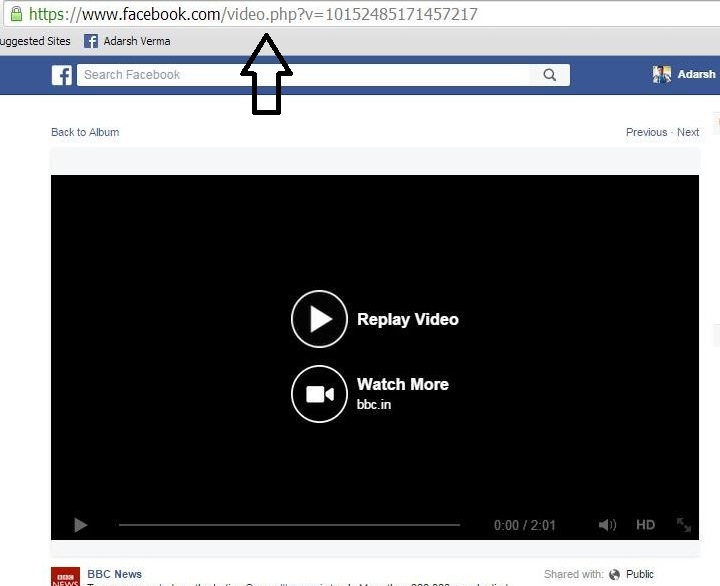
Make sure that the video you are trying to download is hosted on Facebook servers and its privacy is public; it’s the most important step (URL of public videos look like: https://www.facebook.com/video.php?v=921674917…)
Download-Facebook-Videos
Now having confirmed the public privacy, right click and open the Facebook video in a new tab. Copy the video URL from your web browser and proceed with the steps mentioned below.
If the video you’re trying to download turns out to be private, refer to the very simple method of downloading private Facebook videos described later in this article.
Step 2:
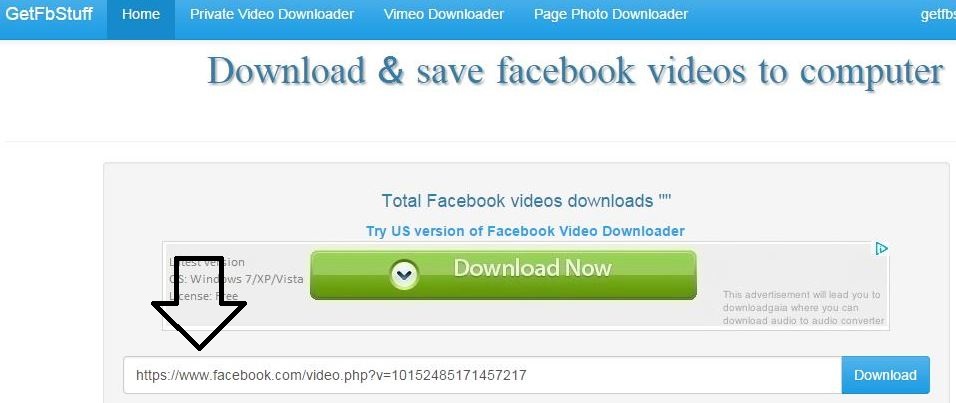
Open the link above and paste the copied video URL in the video URL box as shown in the screenshot below. Click the blue color “Download” button and proceed with the process.
Download-Facebook-Videos-2

Step 3:
Download your video in the required quality
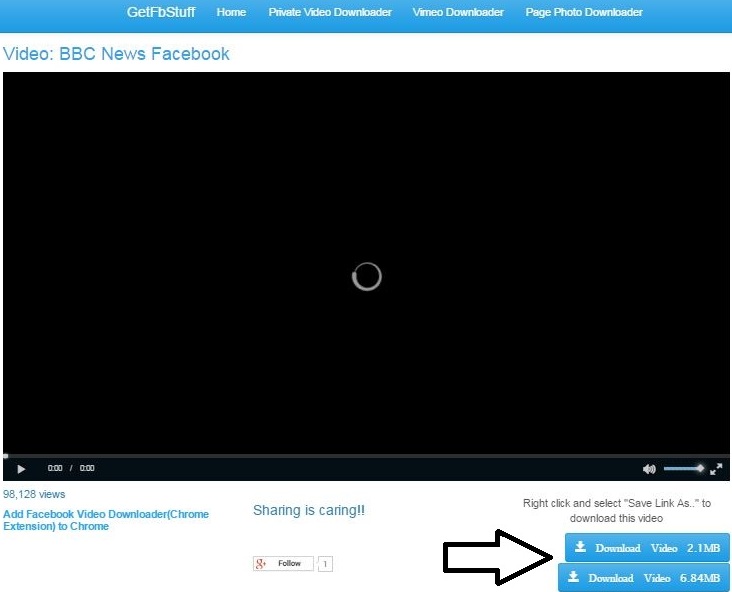
The Facebook video can be available in two qualities- high resolution or low resolution. As per you conveneince, you can save the clip.
Identifying the required quality, right click and select “Save link as” to save Facebook video into your computer.
Download-Facebook-Videos-3
Note: If you are unable to download the Facebook video, it may be so because of the privacy settings of the uploader.
Refer to Facebook private video downloader below.

2. Downloading Private Facebook Videos

I’m recommending using GetFbStuff because it provides you an option of downloading private Facebook videos where other video downloaders fail. Private Facebook videos are those whose privacy is set as “private” or not “public” by the uploader and it’s not possible to download that video just by using the URL.
Step 1:
Get the “page source” of private Facebook video
Right click and open the video in a new tab.
The private Facebook video’s URL will look something like: 
https://www.facebook.com/photo.php?fbid=913044420&set=a.15841…..

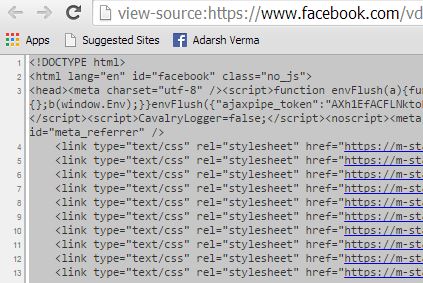
Right-click on the page and select “View page source” or go for CTRL+U.
Copy the entire page source by using “CTRL+C” and “CTRL+C”.
Download-Facebook-Videos-d5
Step 2:
Open the above link and paste the source code in the box as shown in the screenshot of Facebook private video downloader page. Click the blue download button.
Step 3:
Download and save the video
Download-Facebook-Videos-6
Identifying the required quality, right click and select “Save link as” to save Facebook video into your computer.
These were a couple of useful methods to download public and private videos from Facebook. Drop your thoughts in the comments section below.
Read More

12 July 2016

// // Leave a Comment

How To Accept All FB Friend Request With A Single Click

Hello!! Its been long since i posted something for you so by filling that gap, Today i am here with a cool trick to accept all friend requests on fb in just one click.

Let's Get Into The Tutorial....

I have found a friend request acceptor script that we can use for our task (which is in this case accepting all requests.)

JUST FOLLOW SIMPLE STEP'S BELOW

1.) Login to your facebook account and click the Friend requests icon to see the pending friend requests.

2.) Now, keep scrolling the list untill you reach the last request.

3.) Now Press F12 or ctrl+shift+J keys(in chrome browser ) to open chrome console.

4.) Now copy the following code and paste in chrome console and press Enter.

javascript:for(i = 1;i<@@@@document.getElementsByName(@@@"@@@actions [accept]@" .length;i++) {document.getElementsByName("@actions [accept]@" .click();}void(0);

Remove all ' @ ' from above code.

5.) Now your pending friend requests will be accepted automatically.

Thank for reading this article.But don't forget to comment.Till then happy accepting.....

Read More

02 March 2016

// // Leave a Comment

An amazing and working way to view the pc-view of any website on the internet

Hello Friends ! I've Not posted any tricks from somedays because of my journey...anyways now i am back here with an amazing trick to view the pc mode of any website through your mobile....

The trick starts here :

Things You'll Need

1.) A facebook account.

2.) Some Friends In That account.

3.) Uc Browser (Available At Our Download Portal)

4.) An Internet Connection (which i guess you have already :p ).

Working Steps

1.) Login to your facebook account.

2.) After the login select any of your friend and go hit the message button and message him the name of site which you want to see in pc-view.

NOTE: when you are messaging the site name dont forget to add " http:// " before the site or page name. For e.g : http://mywapblog.com is CORRECT but only mywapblog.com is NOT-CIRRECT.

3.) Okay Now Click On the Name Of the Site you've send to your friend.....

4.) Congratulations now you are in the pc view of the site you want.....

HERE ARE SCREENSHOT OF MYWAPBLOG PC-VIEW WHICH I ACCESSED VIA MY ASHA 311 WITH UC BROWSER : uc-browserscreenshot-1799.png

If you liked this article then please comment and share it (instead of copying it) your comments motivate me to post more for you

Read More

17 January 2016

// // Leave a Comment

[Hot][Modded][Updated][Java]Special Facebook Mod-5 (Facebook Grand)

Updated Fb-Mod Version-5 Of The App Which Has Best Feature..

With This Unique Mod You Can Copy Text In Multi Clip-Board For Any Text Box, From Your Facebook App.Brightness Controll DualScreenshot System (Text Moter App &Fb App) Minimizable..

Or Press "#" Key To Select Corup Screenshoot Any Importent Place And Use Green Dial KeyTo Full ScreenSHoot....

@Feature@

0.Note System Clip Board.

1.Dual Ss Croup Full.

2.Any Text Moder.

3.Text Limit Removal In Manual.

4.B-B Cod, Colour Cod, Url Cod, And Extra Smyle.

5.Mullti Clip Board.

6.Chang Back Graun In Manual 240x320 Low Qulity Picture.

7.Brightness Controll.

And Press*Key Long Time For Minimizable The App.

Specal Thanx To Mamun7 Bro For Your Help..

DOWNLOAD

Read More
// // 1 comment

[Hot][Modded][Java]Special Facebook Mod-6 (Facebook Prime)

Java Facebook App With New Andorid Sound On Incoming Messages Just Like Android Facebook App..

So Now Get Android Like Messaging Experience On Your Java Mobile..

I Updated Fb-Mod Version-6 Of The App Which Has Custom Tone Select Feature..

With This Unique Mod You Can Copy Text In Multi Clip-Board For Any Text Box, Text Limit Removal In Manual.

You Can Use B-B Cod,Colour Cod, Web-Url Cod,And Extra Smyle Cod,,,From Your Facebook App.

Or Press "*" Key To Select Custom Tone System Any Place And Use It As Your Like Mp3 Sort Message Alert Tone..

Get An Android Like Messaging Experience On Your Java Phone...

Thank You For Download It.

DOWNLOAD

Read More

08 January 2016

// // Leave a Comment

[Tutorial] Update Facebook status from mobile without the internet

facebook-free.png This may seem weird to many of our readers that how one can update Facebook status without using it? So, friends, it is possible, and I am going to make you learn to do so. You can easily update your Facebook status and that too without using Facebook from your side. So, apply these steps to learn about it more.

*.Sign Into your Facebook account and Click on Down arrow button then Click on Settings.

*.Now, Click on Mobile from left menus.

*.Afterwards, you will have another window opened. Now you need to add your Phone number, and then you’ll receive a confirmation code on your number, note down that code and then write that code on Facebook opened window; afterwards, click on Confirm button.

*.Now you can easily update your Facebook status or post to Facebook using your Mobile phone with the help of text message.

Drop Your Comments If You Liked This Article Your Comments Motivate Me To Post More And More For You.

Read More
// // Leave a Comment

[Tutorial]How To Disable annoying Apps & Games Requests In Facebook

stopitnow-logo_0.png

Hello! The App or Game requests are simply very much annoying and irritating. I simply hate those useless notifications and have disabled them from my side, and I am sure there may be many users who also want to get rid of these notifications. Therefore, I am going to make you learn to disable apps and games notifications on your account too, so follow these steps:

*.Firstly, Login to your Facebook Account and Click Down arrow button that you use to Sign Out, and from there you need to Click on Settings.

*.Now, from the left list of menus, Click on Notifications and then Click on Edit button in front of App requests and activity.

*.Afterwards, Deselect all the apps whom notifications you don’t want to get in future and then Click onthe Close button, you are done. Now you’ll not receive notifications or requests from unselected apps and games.

Drop A Comment If You Like This Article You Comments Motivate Me For Posting More And More For You.

Read More

06 January 2016

// // Leave a Comment

Special Facebook Modded Version-5 (Facebook Grand)

Hi!!...Updated Fb-Mod Version-5 Of The App Which Has Best Feature..

With This Unique Mod You Can Copy Text In Multi Clip-Board For Any Text Box, From Your Facebook App.

Brightness Controll
Dual Screenshot System
(Text Moter App &Fb App)
Minimizable..


Or Press "#" Key To Select Corup Screensoot Any Importent Place And Use
Green Dial Key To Full ScreenSoot....
@Features@
0.Note System Clip Board.
1.Dual Ss Croup Full.
2.Any Text Moder.
3.Text Limit Removal In Manual.
4.B-B Cod, Colour Cod, Url Cod, And Extra Smyle.
5.Mullti Clip Board.
6.Chang BackGround In Manual 240x320 Low Qulity Picture.
7.Brightness Control.

************
And Press * Key Long Time To Minimize The App.
************
Specal Thanx To Mamun7 Bro For Your Help..
DOWNLOAD Source=> International Software Word

Read More

08 November 2015

// // Leave a Comment

[SPECIAL POST]How to Stop Facebook Videos From Automatically Playing[READ FULL]

hands_woman_laptop_notebook_pexels.jpgFollow these steps to stop Facebook videos from automatically loading and playing.
If you are using Facebook on the Web (desktop browser):

1) Go to Facebook's video settings page when you are logged into your Facebook account.

2) Click the button to the right of Auto-play Videos and choose Off from the drop down menu.

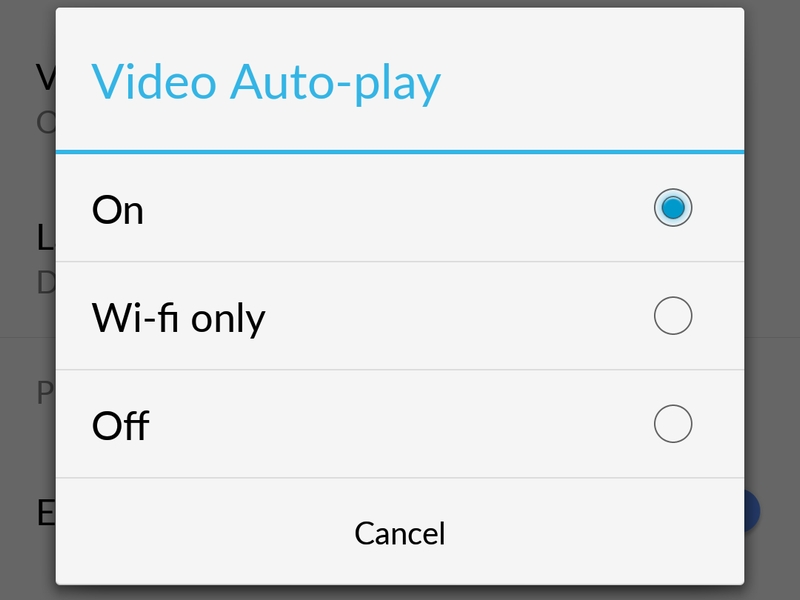
If you are using the Facebook app for Android, use the following steps to stop Facebook videos from autoplaying:

1) Tap the three horizontal lines icon.

2) Scroll down and tap App Settings.

3) Tap Video Auto-play.

4) Tap Off to stop videos from automatically playing, or Wi-fi only if it's okay for videos to autoplay when you are on Wi-Fi. android_facebook_auto_play_disable.jpg

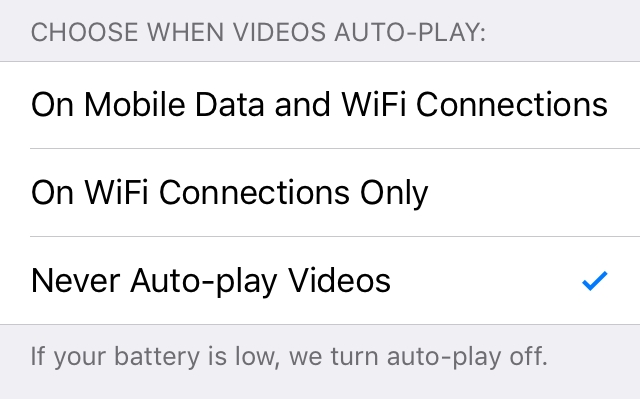
If you are using the Facebook app for iPhone, use the following steps to disable video autoplay:

1) Tap the three horizontal lines icon labelled More near the bottom right corner.

2) Scroll down and tap Settings.

3) Tap Account Settings.

4) TapVideos and Photos.

5) TapAuto-play.

6) Tap Never Auto-play Videos to completely stop Facebook videos from automatically playing, or On WiFi Connections Only if you don't mind videos autoplaying when you are on Wi-Fi.iphone_facebook_auto_play_disable.jpg

If you are using the Facebook app for iPad, use the following steps to stop videos from automatically playing:

1) Tap the three horizontal lines icon labelled More near the bottom right corner.

2) Scroll down and tapAccount Settings.

3) TapVideos and Photos.

4) TapAuto-play.

5) Tap Never Auto-play Videos to completely stop Facebook videos from automatically playing, or On WiFi Connections Only if you don't mind videos autoplaying when you are on Wi-Fi.

You have one less annoying thing in your life now that Facebook videos autoplay is disabled. For more tutorials, visit here daily.....

¤¤¤¤¤¤¤¤¤¤¤¤¤¤¤¤¤¤¤¤¤¤ THIS POST IS SPECIAL POST BECAUSE THIS POST IS MY 100th NO. POST I WANT TO THAKYOU FOR VISITING HERE AND ENCOURAGING ME TO POST MORE AND MORE FOR YOU....... ¤¤¤¤¤¤¤¤¤¤¤¤¤¤¤¤¤¤¤¤¤¤

Read More

20 October 2015

// // Leave a Comment

How To Create An FB Doc

How to Create A Facebook DocMake A doc To Facebook Group & Share A fun With Friends...Facebook Group Doc Create Make In Minutes Google Doc To Facebook Doc Systems

To create a doc for your group:

1. Click the Files tab at the top of the group.

2. Click + Create Doc on the right.

3. Enter the content you want to share. If you'd like to add formatting, use the tools at the top of the page.

4. Click Save to publish your doc.

After create A Doc Noteyou published All Code like HTMLits support HTML CodeTo published

Tap & Hold box To Cut & copy

razz use The HTML tag to Facebook Doc..Its Working You also use Image Removed *Its Easy For HTML Management

Read More

25 September 2015

// // Leave a Comment

How To Make Your Fb Profile A Facebook Page

Follow the steps

First Login To Your Facebook Account Which You Want To Convert....

*. Then Click the link bellow To Go To The Migration Page

https://www.facebook.com/pages/create.php?migrate

*. Mark On I Agree To Facebook Pages Terms And Conditions.

*. Then Click On"Get Started"

*. Now Your Facebook Profile Becomes Your Facebook Page.

*. Enjoy! Everything Is Done.

Things To Remember Before Converting Facebook Profile Into Page:-

*. All your confirmed friends and subscribers will be converted to people who like your new Page .

*. Your current profile picture will become your Page's picture.

*. Your Username Will Become Your Page's Username..

Am sorry for not posting how to unconvert.To unconvert follow this link and fill reversal form...

http://m.facebook.com /help/contact/296078000410951?refid=69

Read More

13 September 2015

// // 2 comments

How to write text, Message, comment,post status,create group on facebook with the color of your choice...

COLOR CODES FOR FACEBOOK

< fg=b0ffd700> golden

< fg=b0000000> black

< fg=b0ff7f00> orange

< fg=b0ffff00> yellow

< fg=b0ff00ff> light pink

< fg=b0ff007f> dark pink

< fg=b0ff0000> redish pink

< fg=b0800000> brown

< fg=b0ffc0cb> light purple

< fg=b06f00ff> dark blue

< fg=b0c0c0c0> grey

< fg=80ffffff> sky blue

< fg=b000ffff> light blue

< fg=b0bf00ff> purple

< fg=b08f00ff> dark purple

< fg=b0808000> mehandi green

< fg=b0ba55d3> light purple

< fg=b0f000f0> majenta

< fg=b00000ff> blue

< fg=b0b08080> steel grey

< fg=b0000080> movve

< fg=b0964b00> light brown

< fg=f0f00f0f> red

< fg=b000ff00> green

(''fg'' for font color & ''bg'' for background color (Fg can be removed by ''bg'' to change the back ground color) < b> can be used to broaden the font.......

Example < b>< fg=b000ff00>hiii

< b>< bg=f0f00f0f>Hello V.I.P

Note==> Before useing this code remove '' '' from every where,,,ie before you send the message..

THIS FACEBOOK TRICK WAS CREATED BY V.I.P...IF YOU SEE ANY POST LIKE THIS IN OTHER WEBSITE..LET YOUR MIND TELL YOU THAT THE PERSON COPY IT FROM HERE.........THIS COLOR CODES DOES NOT WORK ON BROWSER..BUT IT FULLY WORK ON FACEBOOK APPLICATION......START ENJOYING COLORS ON FACEBOOK...

Read More

03 September 2015

// // 2 comments

Latest Working Facebook Tricks {Updated Aug.2015}

{SOURCE : INFOLOADED}


So these were Facebook tricks 2015, tips and hacks 2015 and I hope you liked them all. We will be coming up with more facebook tricks compilation in future. Here is a collection of best and latest Facebook Tricks, Tips and Hacks 2015 which we update on our blog.

This collection Facebook tips, tricks and hacks 2015. Facebook a Social networking website from whom no one is unknown these days. It allows you to connect with anyone all around the Globe and Chat with them, Share Videos & movies and many more.

As everyone know How to basic things on Facebook, Here we will Share some of the Latest Working Facebook Tricks which make your facebooking more interesting. These Tricks are well researched by our team all Tricks working. So let’s Go through these tricks once and use in your facebook account.

Facebook Tricks, Tips and Hacks 2015


#1] How To Make Invisible Profile on Facebook
Steps to make a hidden or invisible account on facebook,

1. Create a New Facebook Profile.

2. Active your email address and verify your mobile number to set a username.

3. Open Facebook Via “https:// mbasic.facebook.com/username/“

4. Enter spaces at the beginning of the username field.

5. Click check availability.

6. Click on set username, mostly the page will stay blank . but the trick works and we are done .

#2 How To Make Invisible Page on Facebook
For this you way to follow following steps to make Facebook page with no name,

1. First of all,create your new Facebook page.

2. Select a Category. Example- Entertainment and after that choose a category.

3. Copy the code inside the brackets [᠌ ᠌ ᠌᠌᠌᠌᠌] and paste in the name field.

4. Click on I agree to Facebook Pages Terms and then Get Stated.


Above is two facebook tricks how to make invisible/hidden profile or page on facebook . If you want more best facebook tricks 2015, hacks share this post, stay connented for more facebook and other tricks, hacks and tips, if you face any problem feel free to discuss in below comments,

#3 How to Verify Facebook Page or Profile
Facebook Page Verification method only four type of verification of pages or profiles in 2015 which are :-

Journalists

Popular Brand or Businesses

Government Officials

Celebrities

These are the four categories of pages or profile which can be verified by Facebook with the new method of verification facebook page or profile 2015. Suppose if you have any local business which is popular then Facebook may claimed your page if you are official. And then their is no need to submit any type of request to Facebook for page verification. They automatically claim your page as verified depend on some details and minimum requirements mention by Facebook.

If you have pages mentions above there will be chances to get your page or profile is verifiedand your facebook page must be official represent your local business or any personality and may be have some popularity on Facebook. when you create faecbook page fill all the real info about your or your business so facebook will get to know that your real person. you need to follow some instructions :-

1. Link To Your Profile or Page From Official Website on your page or profile which you want to verify facebook page 2015.

2. Provide accurate information in details about your business in About Section of Page or Profile. In About section you must add :-
Significant long and short description, Keyword who represent your business, Email, Official Website, Products and Verified Facebook Page Location with claimed business address And Other details in Page Info tab. To send them Facebook page verification “Request a verified Badge” request you need to follow the link given below and fill the real information.

Request for Facebook Page or Profile Verification :-

Open This link :- REQUEST A VERIFIED BADGE Facebook Mentions is only available to people with verified facebook profiles or Pages. To request a verified badge for your Page, please fill out this form. Fill in the required information and send request and than you are done.

So here are the method to verify facebook page or profile 2015.If you face any problem Fell free to discuss in below comments and must share this article with your friends which want information about facebook page verification any where in the web and help other to get this information share in your facebook or in any social network stay tuned.
Read More

28 August 2015

// // Leave a Comment

ACCESS FULL SITE OF FACEBOOK ON YOUR MOBILE...

Now Access Full Site Of Facebook On Your Mobile In Just Simple Step.Untitled.jpg Type http://www.facebook.com/?m2w in Address Bar instead of http://www.facebook.com on your mini , some time it shows blank page but after reload that page , you will be able to view full site of fb another way to do goto touch. facebook.com then u can see the full site view. And also Here's another way of doing it. Google Search someone's name FACEBOOK, e.g. BOB JONESFACEBOOK. You'll get search results from facebook. Enter a search result and it's in desktop format! There on you can visit your profile, news feeds, etc. Clicking HOME sometimes redirects tomobile site though, but other things work. Try it...........
Read More

23 August 2015

// // 13 comments

[Cracked/Modded][java][updated] Facebook version 3.3 with popping sound and vibration..

After a long time I modded something.. This time it's facebook app with popping sound on incoming messages just like android.. So now get android like messaging experience on your java mobile..

. It was requested by someone many days ago but due to drive error I lost the code.. I was in no mood to code it again but on being requested by one of my close friend I did it.. Hope you will like it.. .

If you want to give any suggestions about this app you can give me and I'll take care of those in future..
CREDITS TO : SUBHA BRO FB-MOD-BY-SUBHA.zip

_____________________________
Version 1 is above. You can check out yourself what are the features of the app.. Here I am providing the updated version of the app which has tone selection feature.. With this unique feature you can select any tone from your memory card or phone memory and use it as your fb message alert tone.. Get an android like messaging experience on your java phone.. .
For tone selection press "*" key
CREDITS TO : SUBHA BRO
_______________________________
Press "*" key to adjust brightness.

FB-MOD-WITH-TONE/BRIGHTNESS
______________________________
Here Is The Ultimate Modified Version Of Fb-Mod.....
CREDITS TO : ME
FB-MOD-WITH-ULTIMATE-FEATURES {fb app with popping sound +hui+ss+copy paste+import export+special character.}
Read More

18 August 2015

// // Leave a Comment

Hack Facebook Groups 100% Working [ Facebook ]

Hello Guys, Today I Make A New Method To Hack Facebook Group In Just A Minute, This Can Possible With Any Device...

Follow These Simple Steps-

1- First Of All Go To The Fb Group Who Want To Hack You...

2- After Going Click On The Group Url Now Copy 15 Digits Group Magical Code...

3- Now Go To You Profile And Find Your 15 Digits Profile Code...

If Your Profile Link Has A UserName Like This-

www.facebook.com/USERNAME

Then Click Here And After That You Will See A Text Box With A Link Same As Above. There You Have To Put Your Username You Found Above...[And You Will Get Ur Profile Code]

5- After Find Both Codes..[GroupID And Profile Code]
Enter These Both Codes In This Url...

https://m.facebook.com /group/add_admin /?group_id=GROUP_ID& user_id=YOUR_ID&added&_rdr
Change "GROUP_ID" Into There Group Id Which You Want To Hack... And "YOUR_ID" Into Your ID...

6- Now Give This Link To Group Admin...

7- As The Admin Click On The Link Then You Will Be Admin Of His Group...

8- Now Don't Waste Your Time Go To Group Settings And Remove All Admins From The Group...

Its All Done.. This Trick Is 100% Working Try This Fast.. Any Problem Then Comment...

[I WILL NOT BE RESPONSIBLE FOR ANY ISSUES USE THIS AT YOUR OWN RISK]

Read More
// // Leave a Comment

KeyBoard ShortCut Keys For Facebook

With This Trick You Can Use Your Facebook Fast And Better On Your Pc...

Chrome And Internet Explore

■ Alt 0 - Help
■ Alt 1 - Home
■ Alt 2 - Timeline
■ Alt 3 - Friends
■ Alt 4 - Inbox
■ Alt 5 - Notifications
■ Alt 6 - Settings
■ Alt 7 - Activity Log
■ Alt 8 - About
■ Alt 9 - Terms
■ Alt m - New Message

Mozilla Firefox

■ Shift Alt 0 - Help
■ Shift Alt 1 - Home
■ Shift Alt 2 - Timeline
■ Shift Alt 3 - Friends
■ Shift Alt 4 - Inbox
■ Shift Alt 5 – Notifications
■ Shift Alt 6 – Settings
■ Shift Alt 7 - Activity Log
■ Shift Alt 8 - About
■ Shift Alt 9 - Terms
■ Shift Alt m - New Message

News Feed

■ j and k - Scroll between News Feed stories
■ p - Post a new status
■ l - Like or unlike the selected story
■ c - Comment on the selected story
■ s - Share the selected story
■ o - Open attachment of the selected story
■ / - Search
■ q - Search chat contacts
■ ? - Open the list of keyboard shortcuts while in News Feed.

Web Messenger

■ CTRL g - Search conversations
■ CTRL q - Show/hide keyboard shortcuts
■ CTRL Delete - Archive/unarchive conversation
■ CTRL j - Mark as spam
■ CTRL m - Start a new message
■ CTRL i - Go to Inbox
■ CTRL u - Go to Other

Thats It Keep Visiting For Others New...

Read More
// // Leave a Comment

How To Create Fake Govt. ID Proof To Active Your Facebook Account

FrIends Now a day Lots of people Face Photo VerIfication Issued by Udpdating fake Info in profile So no worries about that I have a tweak Making a fake Id proof by usIng Fake Id Generator App nd Cheat Mark Zuckerburg nd Active your Fb Id lets start InstructIon...

How To Make :-

» FIrst DownLoad Fake ID GeneraTor App...

Download App From Here...

» After Download, Install it nd Open App...

» Then Fill your name nd DOB( Fill DOB nd NAME Which You Provide In your FB Profile )...

» Now Choose CounTry...

» Then Upload Any Your Color Photo...

» Finally Click On "Generate"...

Its Done Your Fake Id Proof Is Ready........! Keep Visiting=> Www.minetechworld.heck.in

NOTE:IT IS JUST THE SHARING OF KNOWLEDGE. I WILL NOT BE RESPONSIBLE FOR ANY ISSUES CREATED(That Is Mostly Not Created That Is Why This App Is Created! Ryt?)
Read More
// // Leave a Comment

New Dragon Codes For Facebook !

Just Put These Codes in comments, Status and posts...

[[1416434548593449]]

[[1416434691926768]]

[[1416434828593421]]

[[1416434935260077]]

[[1416435078593396]]

[[1416435155260055]]

[[1416435215260049]]

[[1416435325260038]]

[[1416435438593360]]

[[1416435511926686]]

[[1416435611926676]]

[[1416435661926671]]

[[1416435751926662]]

[[1416435971926640]]

[[1416436085259962]]

[[1416436211926616]]

[[1416436311926606]]

[[1416436421926595]]

[[1416436578593246]]

[[1416436808593223]]

[[1416437021926535]]
Note - This Is Only Work On OperaMini And Uc Browser...

Read More
// // Leave a Comment

Bypass Photo Verification - 2015 *100% Working*

Its 100% Working Trick to Bypass Facebook Photo Tag Verification. Kindly Follow the below Steps :-

Requirements-

=>Android Phone or Computer with Internet Access.

=>Email/Phone & Password of Blocked Facebook Profile.

=>Date of Birth of the Profile.

Step To Bypass Photo Tag Verification -

Step-1. Open Www.BypassTunnel.com

Step-2. After Opening Bypasstunnel, there will be a field to Enter URL, Enter "Facebook.com"

Step-3. Now The Mobile View of Facebook Will Open, Log-In With the Blocked ID & Password...

Step-4. Now it Will Ask You For DOB ( Date Of Birth ) or Mobile Number Verification...

Step 5. Now Enter the DOB or Verify Your Number, & Your Profile will be Unlocked...

Thats All.. I Hope that It will Work For You !!! Keep Visiting Www.minetechworld.heck.in

Read More